THE SHORT ANSWER
What matters most.
Use broad match to explore related searches, phrase match to keep the keyword’s meaning in the query and exact match for more steering around the same meaning or intent. All three can include close variants. Choose by offer, measurement readiness and the amount of query control you need, then review search terms, qualified enquiries and sales before expanding or narrowing.
QUICK REFERENCE
Key takeaways.
- KEY POINT 01Broad, phrase and exact describe different matching reach—not literal, guaranteed query lists.
- KEY POINT 02Exact match can include searches with the same meaning or intent, not only identical wording.
- KEY POINT 03Broad match can reach related searches and should be paired with Smart Bidding under Google’s current guidance.
- KEY POINT 04All positive keyword match types are eligible for close variants by default.
- KEY POINT 05The Search terms report is useful but may omit some low-activity queries for privacy.
- KEY POINT 06Judge a match-type test by relevant enquiries and business outcomes, not click volume alone.
THE BASICS / TARGETING IS NOT THE QUERY
Separate a keyword from the search term
A keyword is what an advertiser adds to a campaign. A search term is what someone actually enters before an ad appears. Match types connect those two ideas; they do not guarantee that every query will contain the same words as the keyword.
For a Mumbai agency, a keyword such as “digital marketing agency” may be eligible for searches with related wording or a more specific service need, depending on its match type and the context Google evaluates. The query still has to make sense for the service, ad and landing page. A broader match is not automatically useful if the business cannot serve the intent it reaches.
Keep location settings and keyword wording distinct. Adding “Mumbai” to a keyword is not a substitute for selecting the geographic areas a campaign can serve. Review location targeting separately, especially if the business serves some Mumbai-region neighbourhoods but not every area.
| Campaign element | What it represents | Question to ask |
|---|---|---|
| Keyword | The advertiser’s targeting input | Which product or service theme should this ad group cover? |
| Search term | A person’s query that triggered an ad | Does this search fit the offer and customer need? |
| Match type | How Google may relate a query to a keyword | How much reach and steering does this test need? |
THE THREE OPTIONS / REACH AND STEERING
Compare broad, phrase and exact match
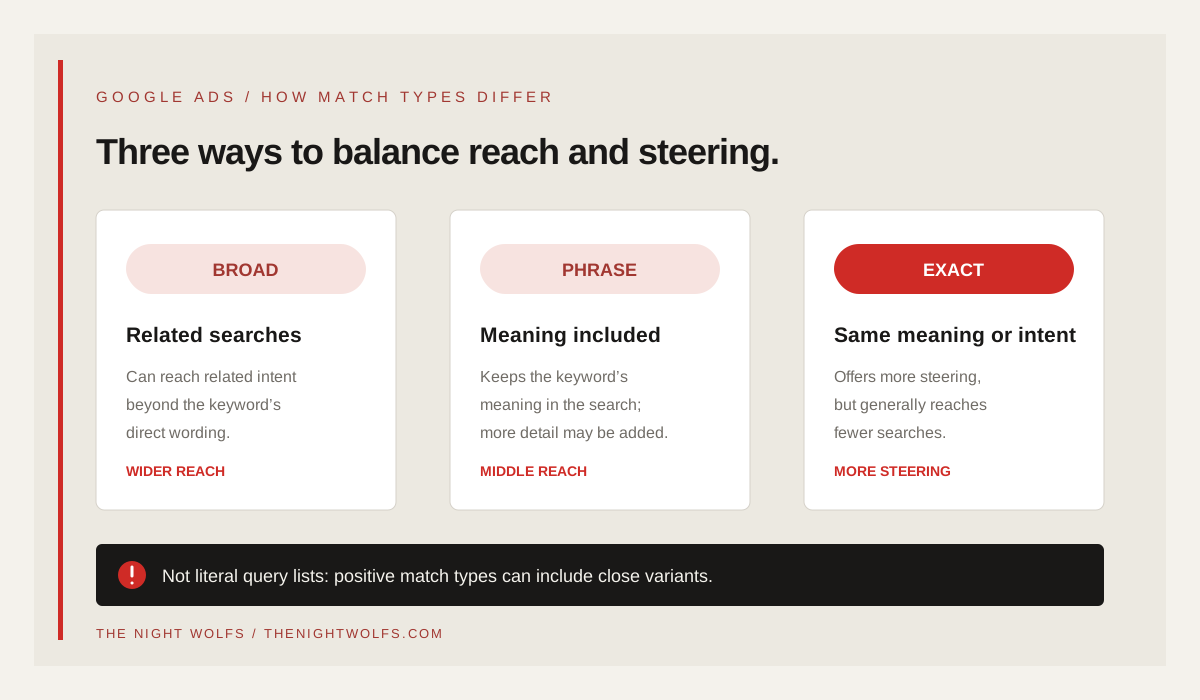
Broad match can make an ad eligible for searches related to the keyword, including some searches that do not use its direct wording. Google says matching may also consider recent search activity, landing-page content, assets and other keywords in the ad group. Broad is the default match type when a keyword is added without a different type.
Phrase match may show ads for searches that include the meaning of the keyword, including more specific wording. Exact match gives more steering and may match searches with the same meaning or intent. In the account, broad keywords use plain text, phrase keywords use quotation marks and exact keywords use square brackets.
These are practical distinctions, not fixed buckets of identical queries. Google describes broader match types as eligible for searches matched by narrower types as well as additional related searches. Review the actual search terms and campaign behavior rather than assuming the punctuation creates a perfectly separated audience.
| Match type | Google’s general description | Syntax example |
|---|---|---|
| Broad | Related searches; widest reach and least steering of the three | digital marketing agency |
| Phrase | Searches that include the keyword’s meaning, possibly with more specific wording | "digital marketing agency" |
| Exact | Searches with the same meaning or intent; more steering and fewer searches | [digital marketing agency] |
CAMPAIGN DESIGN / START WITH BUSINESS FIT
Choose based on the offer and the decision you need
Start with the campaign’s real offer, service area and qualified-lead definition. A campaign for SEO services should be organised around that service and the people who may buy it—not a large list of every phrase containing “marketing.” A narrow theme makes the ad and landing-page promise easier to review.
Use a tighter match when the campaign needs more steering or has little room for exploratory traffic. Consider phrase or exact match for clearly defined service themes, then inspect how searches are matching. Broad match can be a deliberate discovery approach when the team can monitor the queries, support the budget and measure meaningful outcomes.
There is no universal rule that every campaign should start with exact match or that broad match is always better. The right test depends on how specific the offer is, the available budget, conversion measurement, follow-up capacity and the cost of reaching an irrelevant search.
| Situation | Possible starting approach | Check before changing |
|---|---|---|
| Specialist service or tightly scoped offer | Use more steering with phrase or exact themes | Is the search intent specific and is the page relevant? |
| Exploring related demand with reliable outcome signals | Consider a controlled broad-match test with Smart Bidding | Are conversions meaningful and are irrelevant themes monitored? |
| Low or uncertain conversion data | Keep the test contained and improve measurement first | Can the team tell a qualified enquiry from a low-value action? |
MATCHING BEHAVIOUR / WORDS CAN VARY
Remember that close variants apply to positive keywords
Google says all positive keyword match types are eligible to match close variants by default, with no way to opt out. Depending on the match type, close variants can include spelling or grammatical changes, reordered words, function-word changes, implied terms, synonyms, paraphrases and searches with the same intent.
That means an exact keyword is not a promise to match only an identical string. “Exact” offers more steering than phrase or broad, but it can still cover a query with the same meaning. Check how a real search was matched in the account and whether the ad and page answer the need behind it.
Positive and negative keyword matching do not behave identically. Negative keywords do not automatically include the same close variants; review the separate rules before adding exclusions. See our guide to [Google Ads negative keywords](/blog/google-ads-negative-keywords-mumbai-guide) for a safer review process.
- Do not create a duplicate keyword list just to cover every spelling variation.
- Do not assume exact match means identical words only.
- Check the match type shown for a query when investigating campaign traffic.
- Review negative keyword behavior separately before excluding a term.
BROAD MATCH / EXPLORE WITH GUARDRAILS
Pair broad match with Smart Bidding and sound measurement
Google’s current guidance recommends using Smart Bidding with broad match. Broad matching can reach a wider set of related searches, while Smart Bidding uses auction-time signals to set bids toward the selected conversion goal. This is a platform recommendation, not a guarantee that broad match will improve a specific account.
Before widening reach, confirm the conversion actions reflect outcomes that matter. A page view or a messaging-button tap may be useful as a diagnostic, but it is not necessarily a qualified lead or sale. If the bid strategy is optimising toward an easy but low-value action, broader traffic can amplify the wrong signal.
Keep the first test bounded to a coherent service or offer. Verify budgets, locations, landing pages and negative keywords, then inspect search terms and lead quality during the test. Avoid changing the match type, creative, budget and page all at once if you need to learn what caused a difference.
- Verify the primary conversion action and how it is counted.
- Set a budget the business can sustain while learning.
- Use a focused keyword theme and a landing page that matches it.
- Review search terms, qualified enquiries and sales—not only platform-reported conversions.
ONGOING REVIEW / CHECK ACTUAL QUERIES
Use the Search terms report as a sample, not a complete transcript
The Search terms report shows available queries that triggered ads on the Search Network and how they performed. It can help uncover relevant phrases, weak message-to-query matches, negative-keyword ideas and content questions worth answering on a landing page.
Google notes that some low-activity queries may be omitted to protect privacy. Search terms insights can group low-volume activity into themes or “other queries,” so neither view should be treated as a record of every search. Use the report alongside campaign results and questions from sales or customer-service teams.
Review with context: campaign, ad group, keyword, match type, location, cost, conversion action and lead quality where available. A query with no recorded conversion may still be relevant, and the reporting window may not reflect a long sales cycle. Check tracking before concluding that the match itself is the problem.
| Search-term finding | Possible next step |
|---|---|
| Relevant need, unclear ad | Test clearer copy that accurately describes the service. |
| Relevant need, weak page path | Improve the landing page and the next action. |
| Search clearly outside the offer | Consider a carefully scoped negative keyword. |
| Too little evidence or unclear intent | Keep it under review instead of making a broad exclusion. |
ACCOUNT STRUCTURE / KEEP EACH AD GROUP COHERENT
Organise keywords around one clear intent
Group keywords by the service, product or need the ad group is meant to answer. If “SEO services,” “website design” and “Google Ads management” lead to different pages or sales conversations, placing them together can make the ad less specific and the results harder to interpret.
Avoid creating many near-duplicate keywords solely to control every possible wording. Google’s matching systems can interpret meaning and close variants, and very similar keywords can compete for similar searches. Structure the account so each theme has a clear ad and destination, then use actual query behavior to decide whether it deserves a separate group.
For a local business, separate service intent from geographic coverage. Use campaign location settings for areas the team can serve; use the landing page to state coverage accurately. A keyword containing a neighbourhood name does not by itself establish that the person is physically in that area or that the business can fulfil the enquiry.
- Give each ad group a clear service or product theme.
- Use an ad that answers the theme instead of repeating a generic agency message.
- Link to a page that explains the service, area served and next step.
- Review overlaps before splitting the same intent across many near-identical keywords.
TEST PLAN / CHANGE ONE THING AT A TIME
Run a match-type test you can learn from
Write down what you expect to learn before changing a campaign. For example, a team might test whether a broader theme reaches additional relevant searches while preserving qualified-lead quality. That is a question to measure, not a prediction that more traffic or lower costs will follow.
Record the baseline period, campaign, offer, budget, location settings, bid strategy, conversion definitions and any other changes. Compare similar dates and account for conversion delays. If several settings change at once, it becomes difficult to tell whether a shift came from match type, seasonality, creative, budget or tracking.
Choose the review window to fit the campaign’s volume and sales cycle. Do not stop a test after one unusual click or keep it running solely because the platform reports more conversions. Check whether the enquiries can be served, whether the team followed them up and whether outcomes were recorded consistently.
| Before launch | During the test | After review |
|---|---|---|
| Define the business outcome and verify conversion tracking. | Review search terms and watch for clear offer mismatches. | Compare relevant demand, qualified enquiries and sales. |
| Choose one campaign theme and note the baseline. | Record changes to budget, ads, pages and bidding. | Keep, narrow or stop the test based on the evidence. |
For a related measurement checklist, read our [Google Ads conversion tracking guide](/blog/google-ads-conversion-tracking-mumbai). For the city and service-area controls, see [Google Ads location targeting in Mumbai](/blog/google-ads-location-targeting-mumbai-guide).
DECISION / OPTIMISE FOR THE BUSINESS
Measure useful demand—not the match type label
A match type is a control for eligibility, not a campaign outcome. Review whether the campaign reaches searches that fit the offer, whether the ad sets accurate expectations, whether the landing page supports the next step and whether the resulting enquiries become valuable conversations or sales.
Look at spend and lead quality together. A smaller number of suitable enquiries may be more useful than a larger number of low-fit forms. If lead quality drops, inspect the search terms, conversion action and follow-up path before making a sweeping change across the account.
No match type can guarantee a certain cost per lead, position or volume. Competition, auction conditions, budget, location, offer, ad quality, landing-page experience and response speed all affect the outcome. Use match types to create a testable route from search intent to business results.
- Count enquiries that meet the business’s agreed qualification criteria.
- Track whether qualified enquiries receive timely follow-up.
- Compare sales or booked work when the sales cycle allows.
- Document what changed and what the team learned.
THE DETAILS
Questions worth
asking early.
Clear answers about google ads keyword match types in mumbai before you choose your next step.
Does exact match mean the search must use the same words?
No. Google says exact match can show ads for searches with the same meaning or intent, including eligible close variants. It gives more steering than phrase or broad match, but it is not a literal-string guarantee.
Should every Google Ads campaign use broad match?
Not automatically. Google recommends pairing broad match with Smart Bidding, but a business should also verify its conversion goals, budget, landing page and ability to review lead quality. Test it in a focused campaign rather than assuming it fits every offer.
Can broad, phrase and exact match keywords reach similar searches?
Yes. Google describes broader match types as eligible for searches matched by narrower types as well as additional related searches. The types are not three perfectly separated lists; review actual search terms and account behavior.
Does adding Mumbai to a keyword target people physically in Mumbai?
Not by itself. Keyword wording and campaign location settings are separate controls. Choose locations based on the business’s real service coverage and review location settings independently.
Will the Search terms report show every query?
No. Google may omit some low-activity queries from the report to protect privacy. Use available search-term data as a useful sample, alongside search-term insights and business outcomes.
Does changing match type guarantee more leads or lower costs?
No. Results depend on the offer, competition, bids, budget, query relevance, landing page, conversion tracking and sales follow-up. Measure qualified outcomes rather than promising a fixed improvement.
SOURCES & FURTHER READING
- Google Ads Help: About keyword matching options (opens in a new tab)
- Google Ads Help: Keyword close variants (opens in a new tab)
- Google Ads Help: About the Search terms report (opens in a new tab)
- Google Ads Help: Your guide to broad match (opens in a new tab)
- Google Ads Help: Basic tips for building a keyword list (opens in a new tab)