THE SHORT ANSWER
What matters most.
Review actual search terms, label them by intent, and add a negative only when the evidence shows the query does not fit the offer. Choose the narrowest scope and match type that solves the problem, remember that negative keywords do not expand to close variants like positive keywords can, and verify the result after the change. Search term reports may omit some low-volume queries for privacy, so use the report as a useful sample rather than a complete list of every search.
QUICK REFERENCE
Key takeaways.
- KEY POINT 01Separate the targeted keyword from the search term that triggered the ad.
- KEY POINT 02Review search terms for business fit, not just for high cost or unfamiliar wording.
- KEY POINT 03Use the narrowest useful negative match type and campaign scope.
- KEY POINT 04Negative keywords do not automatically cover close variants, synonyms or every singular and plural.
- KEY POINT 05Check affected campaigns after an exclusion and keep a record of why it was added.
- KEY POINT 06Use qualified enquiries and sales—not clicks alone—to judge whether the change helped.
CAMPAIGN SETUP / KNOW WHAT FITS
Define the customer and offer first
A search term is not irrelevant just because it uses a phrase the campaign manager did not write down. Before editing keywords, state what the campaign is promoting, who it can serve, what areas it covers and what a suitable enquiry looks like. A Mumbai web-design campaign, for example, may be meant for businesses seeking a website project—not every person who searches the word “website.”
Write down a few included and excluded intentions. A service provider might welcome searches about its service, pricing approach or project examples, while job seekers, students looking for a course or people seeking a free template may not match the offer. These are hypotheses to review against the business’s actual offer, not universal rules.
Check the landing page alongside the campaign. If a search appears relevant but people leave because the page does not explain the service, area, price conditions or next step, adding a negative may hide a page problem rather than solve it.
- Name the specific service or product the ad promotes.
- Confirm the audience and locations the business can actually serve.
- Define a qualified enquiry using the sales team’s real criteria.
- Write down the searches that are clearly outside the offer and why.
RESEARCH / LOOK AT WHAT TRIGGERED THE AD
Review actual search terms, not only target keywords
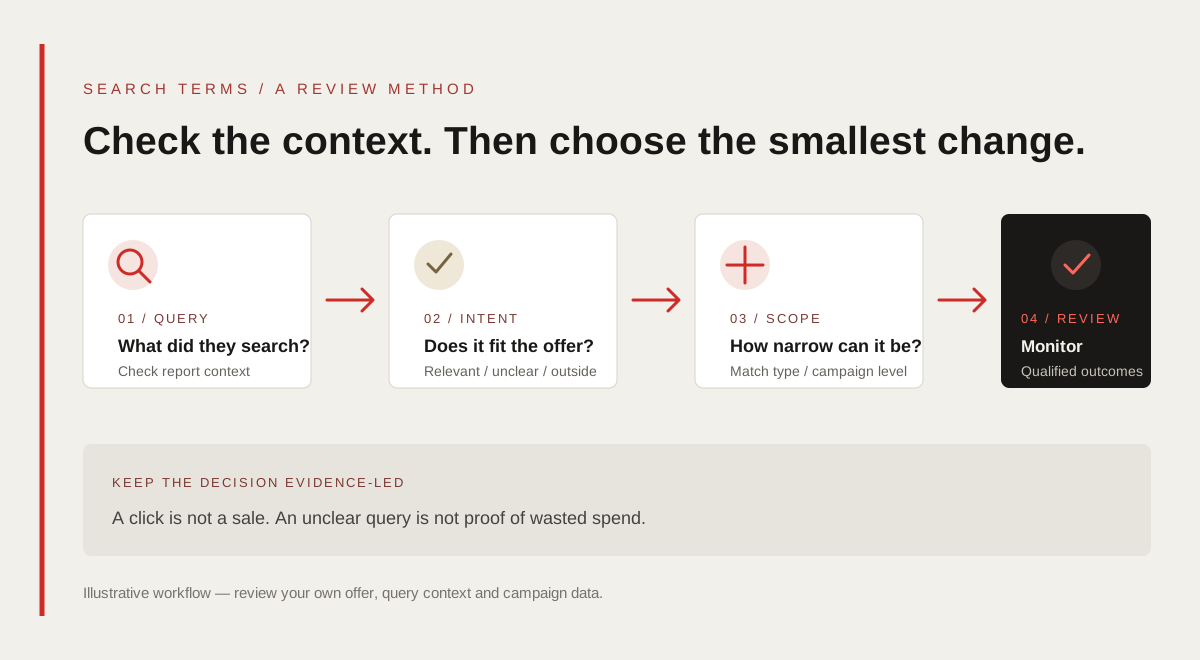
In Google Ads, the Search terms report shows searches that triggered ads on the Search Network and how those searches performed. A search term is the user’s query; the keyword is the advertiser’s targeting input. The report can help identify irrelevant demand, inform ad copy and reveal topics that deserve a relevant keyword or page.
Google also provides Search terms insights, which group queries into themes and subthemes. Google notes that the two views can differ: low-activity queries may be omitted from the report to meet privacy standards, while insights can aggregate them into a theme or “other queries.” Review both when useful, but do not treat either view as a complete record of every search.
Choose a date range that reflects the campaign’s activity and buying cycle. Include the query, campaign or ad group, keyword, match type, spend and meaningful conversion columns available in the account. For small budgets, a handful of clicks is rarely enough context to conclude that a phrase is always wasteful.
INTENT / SORT BEFORE YOU EXCLUDE
Classify each search by what the person needs
Use a short decision label rather than adding negatives directly while scanning a report. The four groups below help separate a genuine mismatch from an unfamiliar but useful way to describe the service.
| Review label | Example for a service campaign | Next step |
|---|---|---|
| Relevant | A business searches for the service the campaign offers. | Keep it; check the matching ad and landing page. |
| Clearly outside the offer | A person searches for a job or a course when the ad only offers agency services. | Consider a carefully scoped negative after checking other campaigns. |
| Related but not ready | A person researches how a service works before choosing a provider. | Decide whether education content or a different campaign is appropriate. |
| Unclear | The query is broad, ambiguous or has too little useful performance data. | Leave it under review; gather more context before excluding it. |
The same word can signal different needs. “Free” may mean an irrelevant template, a free consultation the business actually offers, or a person comparing introductory options. “Course” could be irrelevant for a service-only campaign, but useful for a training campaign. Do not add a word-level exclusion until you have checked how it is used across the account.
MATCHING / USE THE NARROWEST USEFUL RULE
Choose a negative match type deliberately
For Google Search campaigns, Google documents broad, phrase and exact negative match types. They work differently from positive keyword match types. In negative broad match, the ad is blocked when the search contains all of the negative terms, even if they appear in a different order. Negative phrase match blocks the same terms in the same order, while allowing extra words around them. Negative exact match blocks the exact terms in that order without extra words.
For a hypothetical agency campaign that does not sell training, the phrase negative “seo course” can exclude searches containing those words in that order, while an exact negative [seo course] is narrower and can still allow a query with additional words. Check the current match-type behavior and preview the likely effect in the account before saving.
Negative keywords do not automatically include close variants or expansions the way positive targeting can. Google specifically notes that singular and plural forms or synonyms may need separate review when they should also be excluded. Do not assume a single negative covers every spelling, word form or related intent.
| Negative type | General Search behavior | Use when |
|---|---|---|
| Broad | Blocks searches containing all negative terms, in any order. | The full combination is consistently outside the offer, regardless of order. |
| Phrase | Blocks the terms in the same order, with possible extra words around them. | The sequence itself identifies the unwanted intent. |
| Exact | Blocks the exact terms in that order, without additional words. | Only the specific query is a mismatch and nearby searches may still fit. |
ACCOUNT STRUCTURE / LIMIT THE BLAST RADIUS
Apply the negative at the right level
A negative can be applied to an ad group, campaign, a shared list or—where supported—an account-level list. Match the scope to the evidence. If a query is unsuitable for one service but relevant to another, a broad account-level exclusion could suppress useful traffic elsewhere.
Before editing a shared list, check which campaigns use it and whether those campaigns have different offers, audiences, locations or sales goals. Add a note describing the query pattern, reason, date and owner so another person can understand the decision later.
If you run Search alongside Shopping, Performance Max, Display or Video, do not assume Search negative matching and controls behave the same way everywhere. Review the current controls and eligibility for each campaign type before applying account-wide exclusions.
- Use ad-group exclusions for a mismatch limited to one tightly themed group.
- Use campaign-level exclusions when the same mismatch applies to that campaign.
- Audit every campaign using a shared list before adding a new term.
- Treat account-level exclusions as high-impact changes that need broader review.
QUALITY CHECK / REVIEW, DECIDE, MONITOR
Use a repeatable search-term review routine
A consistent routine helps prevent both missed waste and accidental over-blocking. Start with the campaign’s goal and query context, then document the decision, make the smallest change that fits the evidence and review what happened afterward.
- Export or open the relevant Search terms report and include the campaign context.
- Label each query as relevant, outside the offer, related or unclear.
- Check for other campaigns, ad groups or services that may need the same query.
- Choose the narrowest negative type and scope that solves the mismatch.
- Recheck impressions, relevant enquiries and spend after the change.
Negative keywords prevent ads from showing for specified searches; they do not improve the ad, landing page or conversion path on their own. Use the exclusion to remove a real mismatch, then improve the message and page for the demand the business wants.
MEASUREMENT / FOLLOW THROUGH TO THE BUSINESS
Measure relevance and qualified outcomes
A lower click count is not automatically an improvement. Compare whether the change reduced clearly irrelevant searches while preserving useful impressions, qualified enquiries and sales. Review the landing-page experience and conversion setup too; a relevant query that does not convert may be a page, offer or follow-up issue.
Use consistent definitions and compare similar date ranges. Note any simultaneous changes to bids, budgets, locations, ads, pages or conversion tracking so the team does not attribute every movement to a negative keyword. For a long sales cycle, allow for the time between click, enquiry and a recorded outcome.
Keep personal information out of query labels, tracking parameters and analytics events. Google Ads reporting may not show every low-volume query, and platform attribution is not a perfect account of why a customer chose to contact the business.
| Signal | What to ask |
|---|---|
| Irrelevant query spend | Did a clear mismatch stop consuming budget after the exclusion? |
| Relevant impressions and clicks | Did the campaign continue reaching searches that fit the offer? |
| Qualified enquiries | Did the customer need and service area match the business? |
| Sales or booked work | Did the enquiries become outcomes the team values? |
| Landing-page behavior | Does the page answer the relevant query’s real question? |
GUARDRAILS / AVOID BLOCKING GOOD DEMAND
Avoid common negative-keyword mistakes
Do not add a negative just because a query has one click and no recorded conversion. Check the amount of evidence, the sales cycle and whether the conversion tracking is working. A low-volume phrase can still be relevant, especially for specialist services.
Do not copy a universal “negative keyword list” into every campaign without checking the offer. A term like “jobs,” “training,” “free” or “near me” may be irrelevant in one account and commercially important in another. Lists are starting points for review, not a substitute for understanding the business.
Do not rely on the search terms report to expose every query, and do not assume exact-looking wording will match the same way as a positive keyword. Read Google’s current guidance when campaign controls change, and test important exclusions in a limited scope before applying them broadly.
- Do not exclude a query solely because it has no conversion after one click.
- Do not apply shared or account-level lists without checking every affected campaign.
- Do not assume negatives cover plurals, synonyms or other close variants.
- Do not treat clicks, form starts or messaging taps as qualified sales.
- Do not change exclusions and several other campaign settings at once if you need to learn which change mattered.
ACTION PLAN / START WITH ONE CAMPAIGN
Start with one campaign and a documented review
Choose one Search campaign with a clear service, audience and landing page. Write down the included intent, the qualified lead definition and who will review queries. This keeps the first round focused and makes it easier to reverse a mistake.
- Before review: verify the campaign offer, location settings and conversion tracking.
- During review: label query intent and record why each proposed negative is justified.
- Before saving: verify match type, campaign scope and shared-list membership.
- After saving: compare relevant traffic and qualified outcomes over a suitable period.
- At the next review: keep, narrow or remove exclusions that do not fit the evidence.
There is no universal review frequency or negative-keyword list that guarantees a better return. Set a cadence that fits the volume, budget and sales cycle, then adjust it based on new evidence and how quickly the team can respond.
THE DETAILS
Questions worth
asking early.
Clear answers about google ads negative keywords in mumbai before you choose your next step.
What is the difference between a Google Ads keyword and a search term?
A keyword is an advertiser’s targeting input. A search term is what a person searched that triggered an ad. The Search terms report shows available query examples and their performance.
Do negative keywords match close variants?
Google says negative keywords do not automatically match close variants or other expansions. Review synonyms and singular or plural forms separately when they should also be excluded.
Should I use broad, phrase or exact negative keywords?
Choose the narrowest match type that addresses a confirmed mismatch. Negative broad blocks searches containing all terms in any order; phrase blocks the same terms in order with possible extra words; exact blocks the exact terms in order without extra words.
Why do some searches not appear in the Search terms report?
Google may omit some low-activity queries from the report to meet privacy standards. Search terms insights can group themes differently, so neither view should be treated as a complete list of every search.
Can I use one negative-keyword list for every campaign?
Only after checking that every campaign has the same relevant exclusions. A shared or account-level list can affect multiple campaigns, and a term irrelevant to one offer may fit another.
Do negative keywords guarantee a lower cost per lead?
No. They can exclude specified searches, but campaign results also depend on targeting, bids, competition, the offer, landing page, conversion tracking and follow-up. Measure qualified outcomes rather than promising a fixed improvement.