THE SHORT ANSWER
What matters most.
Plan each responsive search ad around one search intent and one real offer. Supply distinct headline and description assets that make sense in different combinations, pin only text that truly must appear in a fixed position, and treat Ad Strength as creative feedback rather than a campaign result. Use asset and combinations reports to guide review, then judge performance with relevant conversions, qualified enquiries and sales.
QUICK REFERENCE
Key takeaways.
- KEY POINT 01Google Ads allows one to 15 headlines and one to four descriptions in a responsive search ad.
- KEY POINT 02Assets can appear in different orders, so each line should be clear and accurate on its own.
- KEY POINT 03Build variety around the same service intent; avoid duplicate headlines that say the same thing.
- KEY POINT 04Pin only text that needs a specific position, because pinning restricts possible combinations.
- KEY POINT 05Ad Strength gives feedback on assets; Google says it is not used to calculate Ad Rank, Quality Score or auction wins.
- KEY POINT 06Use asset and combinations reports to investigate delivery, then judge results by meaningful business outcomes.
THE FORMAT / FLEXIBLE ASSETS
Understand how responsive search ads work
A responsive search ad (RSA) lets an advertiser provide multiple headlines and descriptions. Google Ads tests combinations over time and may show different versions based on the search and other context. The ad can display up to three headlines in the traditional headline area, and the ordering is not fully controlled unless assets are pinned.
Google’s current specifications allow one to 15 headlines, each up to 30 characters, and one to four descriptions, each up to 90 characters. These are field limits, not a recommendation to fill every slot with near-duplicate lines. The goal is useful variety: distinct messages about the same offer that can work in different combinations.
This is different from writing one fixed ad and expecting every search to see it unchanged. Treat the assets as a set of compatible parts. A headline should not depend on a description to correct an exaggerated claim, and a call to action should not promise a next step the landing page does not provide.
| Asset type | Google Ads limit | What to prepare |
|---|---|---|
| Headlines | 1–15; up to 30 characters each | Distinct, accurate messages that fit the same service intent. |
| Descriptions | 1–4; up to 90 characters each | Helpful details, proof the business can support and a clear next step. |
| Final URL | One final URL per RSA | A relevant landing page that continues the ad’s offer. |
CAMPAIGN STRUCTURE / ONE CLEAR OFFER
Start with one search intent and one offer
Before drafting assets, identify the search theme, service, audience and next action. A person looking for SEO services and a person looking for a website redesign may need different messages and different landing pages. Combining unrelated offers makes it harder to write useful assets and harder to understand which searches a campaign is serving.
For Mumbai campaigns, mention a neighbourhood or service area only when it is accurate and useful to the offer. A location in a headline does not set the campaign’s geographic targeting, prove that a business has a local office or establish that every visitor in that area can be served. Keep the geographic settings and the copy truthful.
Write down the promise the ad is allowed to make. Confirm pricing, timelines, guarantees, awards, customer counts and other proof points before using them. If a claim cannot be verified or the business cannot consistently deliver it, leave it out rather than using a stronger phrase to attract more clicks.
| Plan before writing | Example question |
|---|---|
| Search theme | What service or customer need should this ad answer? |
| Offer | What can the business actually provide, and to whom? |
| Location | Which areas can the team serve, and does naming them help? |
| Next step | What will happen after a visitor clicks or enquires? |
HEADLINES / USEFUL VARIETY, NOT REPETITION
Write headline options that add different information
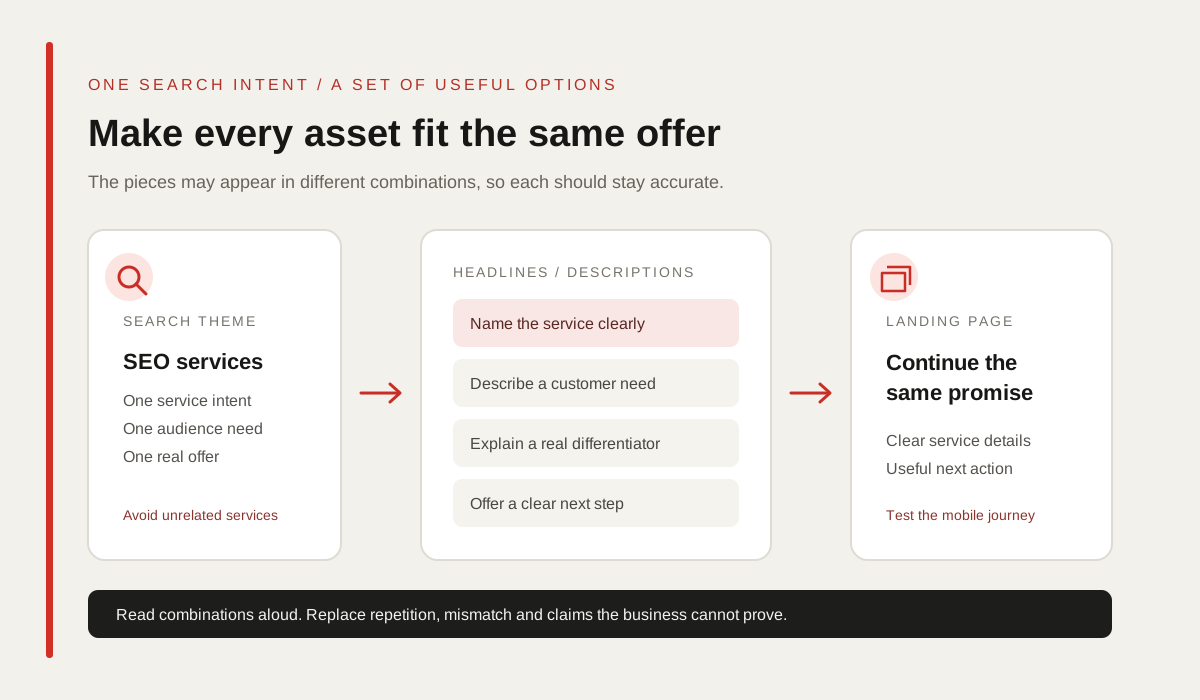
A useful set of headlines gives the system different ways to describe the same offer. One can name the service, another can explain the customer problem, a third can describe a real differentiator and another can invite a clear next step. Avoid writing many versions that only rearrange the same keyword phrase.
Include important search language where it reads naturally, but keep every headline understandable when it appears without the others. Avoid fragments that need a particular companion line to make sense, and do not repeat the same call to action in every slot. The visitor should be able to recognize the service and the value of clicking.
A responsive ad may combine headlines in more than one order. Read the full set aloud in several possible pairings. If any combination creates a misleading claim, awkward grammar, repeated phrase or conflicting offer, rewrite the assets before launch.
| Headline role | What it can contribute | Check |
|---|---|---|
| Service | Name the service or category clearly. | Does it match the ad group and landing page? |
| Customer need | Describe a problem or use case the service addresses. | Is the wording specific without overstating the outcome? |
| Real differentiator | Explain a verifiable part of the process or scope. | Can the business substantiate the statement? |
| Next step | Invite a useful action, such as requesting a consultation. | Does the page make that action easy to complete? |
DESCRIPTIONS / COMPLETE THE MESSAGE
Use descriptions to add detail and a next step
Descriptions can explain what is included, how the process works, who the service is suited to or what a visitor should do next. Use the space to answer a question the headline cannot resolve, not to repeat the same benefit in slightly different words.
For a Mumbai service campaign, a description might clarify the service scope, consultation process or actual coverage area. If availability, price or delivery depends on the project, say so clearly. Avoid vague superlatives such as “best,” “number one” or “guaranteed growth” unless the business can substantiate the claim and the wording complies with applicable advertising rules.
Check that each description works with more than one of the headlines. The ad should set accurate expectations before the click, and the final URL should make it easy to verify the offer and take the promised action.
- Add a detail that helps the visitor decide whether the offer fits.
- Use proof points only when the business can support them.
- Make the next step specific and consistent with the landing page.
- Read each description with several headlines to catch mismatches.
PINNING / KEEP CONTROL WHERE IT MATTERS
Pin assets only when a fixed position is necessary
Pinning tells Google Ads that a particular headline or description should appear in a specified position. This can be useful when important legal text, a required brand name or a time-sensitive offer must appear in a particular place. It also reduces the set of combinations available to the system.
Do not pin every asset simply because a single preferred arrangement looks tidy in the editor. Google notes that pinning can limit flexibility; pinning one asset to a position can cause it to appear there whenever the ad shows, and multiple assets pinned to the same position can still be eligible to rotate. Use the least restriction that meets the real requirement.
If text must always appear but does not need a single exact slot, review whether it can remain unpinned. When a specific position is required, pin only that text and preserve variety in the remaining positions. Check the rendered ad and its combinations after saving.
| Pinning decision | Practical approach |
|---|---|
| A legal or required line must appear | Pin only the required text to a suitable position and verify the result. |
| A message is simply preferred | Keep it unpinned unless there is a clear business or policy reason. |
| Several assets are pinned | Review how many combinations remain and whether all are still coherent. |
AD STRENGTH / CREATIVE FEEDBACK, NOT A RESULT
Use Ad Strength as feedback, not the campaign KPI
Ad Strength gives feedback on the range and relevance of responsive search ad assets, along with action items that may help improve the set. It can prompt a useful review when headlines are repetitive, a service theme is unclear or there are too few distinct options. Treat it as an editing aid rather than a summary of campaign success.
Google states that Ad Strength is not used to calculate Ad Rank, Quality Score or auction wins. It also does not measure whether a landing page is useful, whether a lead is qualified or whether a sale is profitable. A stronger indicator alone is not evidence that a campaign generated better business outcomes.
Use the suggestions that make the ad clearer and more complete, but do not add awkward wording or unsupported claims just to reach a rating. Compare CTR, conversions, conversion value and qualified enquiry feedback against the campaign objective.
| Ad Strength can help you review | It does not tell you by itself |
|---|---|
| Whether the asset set is varied and relevant to its keywords. | Whether the campaign is profitable or the lead is qualified. |
| Suggested creative improvements in Google Ads. | That an ad will win an auction or receive a specific Ad Rank. |
| Whether more useful text options could be added. | Whether the landing page fulfills the ad’s promise. |
REPORTING / LEARN FROM DELIVERY
Review asset and combinations reports carefully
The asset report helps compare the headlines and descriptions used in a responsive search ad. Google has replaced the former performance-label column with full performance statistics for eligible dates on or after 5 June 2025. Use the available metrics to decide which asset deserves closer review or replacement, while remembering that an asset can contribute differently in different combinations and contexts.
The combinations report shows which ad combinations received impressions and which were most common. It is a view of what served, not a promise that a copied static version will perform the same way. Google specifically cautions against using the report to turn responsive ads into fixed ads because the responsive system uses real-time signals.
Look at the report alongside search terms, landing-page behavior and campaign outcomes. An asset with many impressions is not automatically the best message for the business, and a smaller impression count does not prove that a line is ineffective. Compare relevant periods and avoid drawing a strong conclusion from a tiny sample.
| Report | Useful for | Do not assume |
|---|---|---|
| Asset report | Comparing available metrics for individual text assets. | One asset works the same in every search and combination. |
| Combinations report | Seeing common combinations and their impressions. | The most common combination is a guaranteed winner as a fixed ad. |
| Campaign results | Assessing clicks, conversions, value, spend and business feedback. | More clicks automatically mean better enquiries or sales. |
AFTER THE CLICK / KEEP THE PROMISE
Match the ad assets to the landing page
A search ad and its landing page are two parts of the same customer journey. If the ad promises a specific service, the page should make that service easy to find. If it mentions a consultation, the visitor should see a clear way to request one. Sending every ad to the homepage can make the next step harder to understand.
For a Mumbai campaign, show accurate service details, actual coverage areas, the process and a usable contact path. Keep mobile layout, load performance and form behavior in the review. Do not imply a nearby office, project result or client relationship unless the business can verify it.
This alignment also helps the team diagnose performance. When a search, ad and destination each represent a different offer, a low conversion rate can have several causes. Keep the message consistent so that asset and landing-page tests answer a clear question.
- Use a service-specific final URL where it fits the search intent.
- Repeat the offer accurately on the landing page.
- Test the page and enquiry path on mobile before launch.
- Check conversion tracking separately from ad asset ratings.
PRACTICAL CHECKLIST / TEST WITHOUT OVERPROMISING
Launch a focused ad and review business outcomes
Before launch, confirm the ad group has a coherent search theme, the copy meets Google’s current character limits, every possible combination is accurate, required claims are supportable and the final URL matches the offer. Review pinning, sitelinks and other eligible assets as part of the full ad experience.
After launch, review eligible asset statistics and common combinations alongside search terms, CTR, conversions, cost and lead quality. Record the date and the specific change when replacing an asset. Avoid changing every headline and description at once if the team needs to learn what affected results.
There is no single headline formula that guarantees a first-page position or a lower cost. Google Ads auction outcomes depend on several factors, and business results also depend on the offer, competition, budget, page and follow-up. Use the reports to find a useful next test, then keep the changes that improve the customer path and the outcomes that matter.
- Keep each RSA focused on one service or search intent.
- Use distinct assets that remain accurate in different combinations.
- Pin only text that truly needs a fixed position.
- Treat Ad Strength as feedback and reports as evidence to investigate.
- Judge the campaign with qualified outcomes—not asset ratings alone.
THE DETAILS
Questions worth
asking early.
Clear answers about responsive search ads in mumbai before you choose your next step.
How many headlines can a responsive search ad have?
Google Ads currently allows one to 15 headlines, with a maximum of 30 characters each. It also allows one to four descriptions of up to 90 characters each. Confirm current field limits in Google Ads before publishing.
Should I pin every headline in a responsive search ad?
Usually not. Pinning restricts where assets can appear and reduces available combinations. Use it when text must appear in a particular position, such as a required line, and leave other assets flexible where possible.
Does a higher Ad Strength guarantee more leads or better ad rank?
No. Google says Ad Strength is creative feedback and is not used to calculate Ad Rank, Quality Score or auction wins. Evaluate campaign results with relevant conversions, qualified enquiries, sales and cost.
Can I copy the most common combination into a fixed ad?
The combinations report helps show what has served, but Google cautions that a static version is not guaranteed to perform the same. Responsive ads use real-time signals to assemble combinations.
What should a Mumbai business put in its RSA headlines?
Use clear service language, customer needs, verifiable differentiators and a useful next step. Name Mumbai or a neighbourhood only when the business genuinely serves that area and the location detail helps the searcher.
Does an RSA headline with more keywords always perform better?
No. Include relevant search language naturally, but prioritize clear, distinct and accurate assets. Keyword repetition cannot replace a suitable offer, landing page or meaningful conversion measurement.
SOURCES & FURTHER READING
- Google Ads Help: About responsive search ads (opens in a new tab)
- Google Ads Help: Search campaign specifications and format requirements (opens in a new tab)
- Google Ads Help: Best practices for creating effective responsive search ads (opens in a new tab)
- Google Ads Help: About Ad Strength for responsive search ads (opens in a new tab)
- Google Ads Help: Responsive search ad asset reporting (opens in a new tab)
- Google Ads Help: About the combinations report for responsive search ads (opens in a new tab)