THE SHORT ANSWER
What matters most.
Use campaigns for objectives or settings that need separate control, such as distinct budgets or geographic coverage. Within each campaign, group related keywords and ads around a narrow search theme and a matching landing page. Avoid both extremes: putting unrelated services in one ad group and creating a separate campaign or single-keyword group for every small variation. Document the structure, verify measurement and review actual search and lead quality before rebuilding an account.
QUICK REFERENCE
Key takeaways.
- KEY POINT 01A Google Ads account contains campaigns, which contain ad groups with related ads and targeting.
- KEY POINT 02Separate campaigns when important settings such as budget or locations need independent control.
- KEY POINT 03Group keywords and ads by a focused theme, matching the search intent and destination page.
- KEY POINT 04Avoid one ad group for unrelated services and avoid excessive segmentation without a reason.
- KEY POINT 05Google’s current Search guidance favors simpler, consolidated, tightly themed structures.
- KEY POINT 06Document campaign goals, geography, budget and conversion actions before launch.
- KEY POINT 07Plan migrations carefully; account reorganizations can affect accumulated data and campaign behavior.
THE BASICS / EACH LEVEL HAS A JOB
Understand the Google Ads account hierarchy
A Google Ads account contains campaigns, and campaigns contain ad groups. Each ad group brings together related keywords and ads around a common theme. Campaigns hold settings such as budget and targeting, while ad groups help connect a search theme with an appropriate ad and destination.
Think of the structure as a way to make decisions, not as a folder system to fill. If a person reviewing the account cannot tell what a campaign is meant to achieve, where it should serve, or which offer an ad group represents, the structure may need clearer boundaries.
For a local service business, that can mean one campaign for a defined objective and service area, with separate ad groups for services that need different keyword themes and landing pages. The right arrangement depends on whether the business needs distinct control—not on a universal number of campaigns or ad groups.
| Account level | Main job | Example question |
|---|---|---|
| Account | Access, billing and shared administration. | Who can manage the account and payment details? |
| Campaign | Goal, budget, geography and other campaign settings. | Does this work need a separate budget or location target? |
| Ad group | Related ads, keywords and search intent. | Can these searches share a message and landing page? |
| Ad and landing page | The promise shown to a searcher and what happens after the click. | Does the page continue the same offer clearly? |
CAMPAIGN BOUNDARY / SEPARATE SETTINGS
Create a separate campaign when settings need separate control
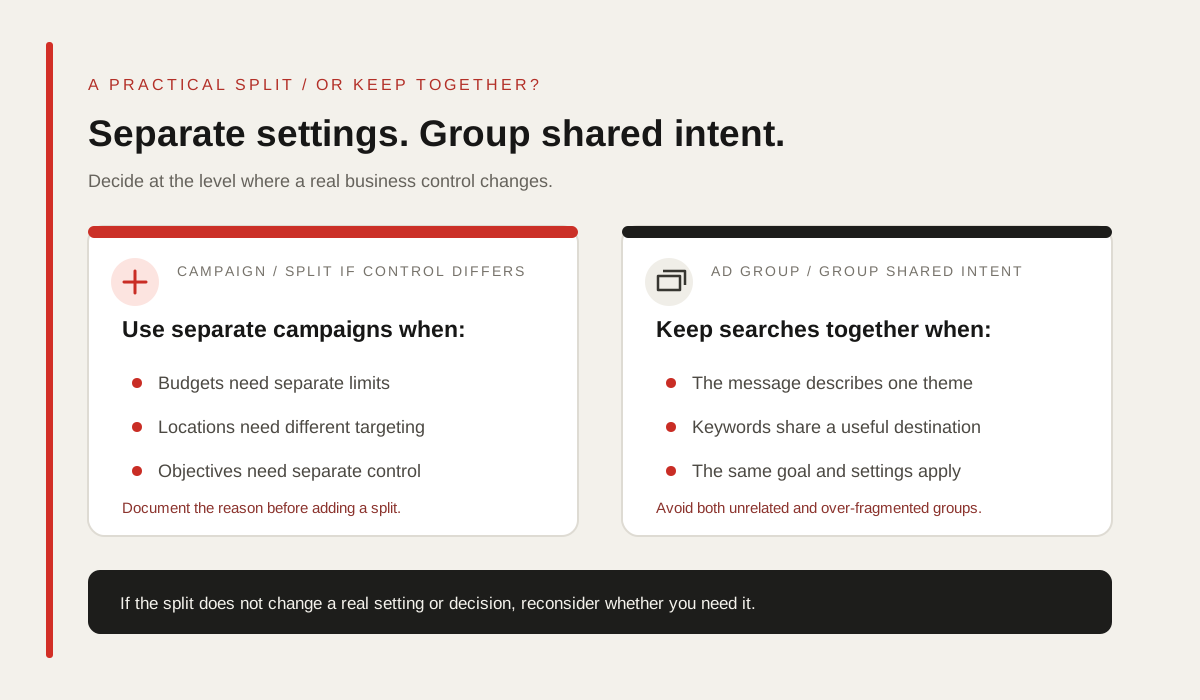
Google’s account-organization guidance gives budget and location targeting as examples of settings that can justify separate campaigns. If two services need different spend limits, operate in different areas or have different business objectives, separate campaigns can make those controls and reports clearer.
If the ads share the same budget and target the same locations, Google notes that one campaign may be enough. Avoid creating a campaign for every neighbourhood, keyword variation or small creative change unless a real setting, business requirement or reporting need calls for it.
Before splitting, name the reason in plain language: “This campaign has its own budget,” “This service has a different service area,” or “This objective needs independent measurement.” If the reason is only that the account looks tidier with more rows, a campaign split may add work without improving control.
| Consider separate campaigns when… | Keep one campaign when… |
|---|---|
| Budgets or spend priorities need independent control. | The services share the same budget and target locations. |
| Different locations or service areas need distinct targeting. | The same locations and campaign settings apply. |
| Objectives or business outcomes must be measured independently. | The offer and conversion goal can be managed together. |
| A separate campaign is required for a meaningful business or operational reason. | The split would only create more rows without adding control. |
AD GROUPS / RELATED SEARCHES TOGETHER
Group keywords and ads by a narrow, useful theme
Google recommends grouping related ads with related keywords so that the ad can answer the search. An ad group for local SEO can include closely related search themes if the same message and destination page make sense. A group that mixes SEO, website development and paid advertising may make it difficult to write a relevant ad or decide which page should receive the click.
A practical test is to read the keywords, the RSA headlines and the landing page together. If one set of ad copy cannot accurately serve the searches—or the destination does not answer one of the needs—split the theme into a separate ad group or reconsider the campaign plan.
At the same time, avoid a single-keyword ad group for every small phrase variation by default. Google’s current Search account-structure guidance encourages simpler, consolidated and tightly themed setups, including moving single-keyword ad groups into relevant themes. Consolidate where the goal, message and destination genuinely align; keep distinct offers distinct.
| Ad-group theme | Possible fit | Likely mismatch |
|---|---|---|
| Local SEO service | SEO audit, local visibility review and closely related SEO searches. | Website design or paid social terms that need another offer. |
| Website development | Website builds and related development searches with one page and message. | SEO campaign management if its scope and destination differ. |
| Paid search management | Google Ads management and closely related campaign support searches. | A broad list of every marketing service the business provides. |
ILLUSTRATIVE EXAMPLE / MATCH THE BUSINESS
Map services without turning every variation into a campaign
Imagine a Mumbai agency that offers SEO, website development and paid campaign management. The structure below is an example for planning, not a recommendation about The Night Wolfs’ live Google Ads account. Whether the example needs one or multiple campaigns depends on budget, locations, objectives and the degree of control the business wants.
If all three services share the same budget and target locations, one Search campaign with three tightly themed ad groups may be easier to manage. If paid search needs its own budget or a separate geographic plan, it could use a separate campaign while keeping the service themes organized inside it.
The principle is to separate at the level where a real decision changes. Do not use an extra campaign to solve a copy or landing-page mismatch that belongs at the ad-group level, and do not keep separate campaigns together when they require different settings.
| Illustrative element | Possible structure | Confirm before launch |
|---|---|---|
| Campaign | Search / Services / Mumbai | Is the shared budget and location target intentional? |
| Ad group 1 | SEO services | Do the keywords, ad and SEO page describe the same offer? |
| Ad group 2 | Website development | Does the destination explain the relevant build service? |
| Ad group 3 | Google Ads management | Is the campaign’s lead goal and service scope clear? |
KEYWORDS / ORGANIZE BY CUSTOMER INTENT
Build keyword themes around how customers search
Start with the categories of services the business actually provides, then list how customers might search for each one. Google’s keyword-list guidance recommends thinking like a customer and grouping similar keywords. Use Keyword Planner or other research to understand demand, but do not treat an estimated volume or bid as proof that a search will generate a qualified enquiry.
Choose match types to suit the desired reach and steering. Broad, phrase and exact do not create fixed lists of identical queries; Google can match by meaning and intent. Keep relevant match types together when they share the same themed ad group and goal, then review the Search terms report and exclusions.
Avoid duplicating the same keyword themes across many campaigns without a clear reason. If two campaigns can both serve similar searches, document the intended boundary and confirm that the offers, settings or goals justify the separation. For match behavior details, see our [Google Ads keyword match types guide](/blog/google-ads-keyword-match-types-mumbai-guide).
- Use service categories and customer wording as the starting point.
- Keep each ad group focused on a message and destination that fit together.
- Use match types deliberately, then review actual search terms.
- Avoid duplicate themes across campaigns unless the boundary has a business reason.
MESSAGE MATCH / SEARCH TO PAGE
Connect each ad group to a relevant ad and landing page
A responsive search ad can include multiple headlines and descriptions, but those assets still need to represent the same service intent. Keep the final URL relevant to the ad group rather than sending every search to the homepage by default.
For each theme, review whether the headline identifies the service, the description explains what is offered and the landing page answers likely questions. Check mobile usability, calls to action and the actual enquiry path. A well-organized account cannot compensate for a page that does not fulfill the ad’s promise.
Make the ad group structure reflect what the visitor needs to know. If two services require different proof, pricing details, qualification questions or next steps, they may need separate ad groups and landing pages even when campaign settings remain shared.
| Search theme | Ad should clarify | Landing page should show |
|---|---|---|
| SEO services | What kind of SEO support is offered. | Scope, process, service area and enquiry action. |
| Website development | What type of website work is available. | Relevant examples, process and project enquiry path. |
| Google Ads management | Which campaign support is included. | Account setup, measurement and management scope. |
CAMPAIGN SETTINGS / MAKE THE GOAL MEASURABLE
Align budgets, bidding and conversion measurement
Campaign settings define important controls such as budget, targeting and bidding. Make sure each campaign’s budget reflects a real business limit and that its conversion goal matches the action the team wants to generate. A separate campaign is useful only when the control or goal needs to be managed separately.
For conversion-focused Smart Bidding, verify the primary conversion action before launch. If SEO, website and paid advertising campaigns all optimize to an easy but low-quality event, splitting them into separate campaigns will not fix the underlying measurement problem. Use meaningful conversion tracking and review lead quality or downstream sales where the business can.
Avoid spreading a limited budget across many small campaigns simply to create detailed reporting. A focused structure with clearly named ad groups may make trends easier to read when settings are shared. If separate budgets or outcomes really matter, document the trade-off and monitor the campaigns independently.
- Set campaign boundaries around genuine budget, targeting or objective differences.
- Verify primary conversion actions and test how they are recorded.
- Use Smart Bidding only with goals and signals the campaign can trust.
- Compare actual spend and qualified outcomes rather than account row counts.
ACCOUNT HYGIENE / MAKE DECISIONS VISIBLE
Name campaigns so the purpose is easy to understand
Consistent names help the team understand the campaign without opening every setting. Include the channel or type, main service, location or audience and goal when those details matter. Keep the structure short enough to scan and avoid using names as a substitute for documenting the actual settings.
For example, “SEARCH / SEO / MUMBAI / LEADS” tells a reviewer more than “Campaign 4.” An ad group such as “LOCAL SEO / SERVICE INTENT” can clarify which searches and ads belong together. These are naming examples only; use a convention that fits the account and platform limits.
Keep a simple account map that records each campaign’s purpose, budget, locations, primary conversions, ad groups and final URLs. When another person makes a change, they can see why the structure exists and whether a proposed edit would affect a separate business objective.
| Level | Illustrative name | Document alongside it |
|---|---|---|
| Campaign | SEARCH / SEO / MUMBAI / LEADS | Budget, geography, bidding goal and primary conversions. |
| Ad group | LOCAL SEO / SERVICE INTENT | Keyword theme, RSA assets and landing page. |
| Ad | RSA / CONSULTATION / VARIANT A | Assets, final URL and date of material edits. |
RESTRUCTURE / PROTECT CONTEXT
Audit before reorganizing an existing account
Before moving keywords or campaigns, export or record the current settings, recent changes, conversion actions, budgets, search terms and business outcomes. Identify the specific problem the reorganization should solve: budget control, mismatched ads, geographic overlap, unclear reporting or an offer that has changed.
Google cautions that reorganizing an account after campaigns and ad groups have accumulated data may affect that data and ad performance. Treat a rebuild as a material change, not a cleanup task with no downside. Where possible, make a focused plan, retain the historical record and monitor the result after the change.
A good structure is not the one with the most campaigns, the most ad groups or the most exact naming pattern. It is the simplest setup that gives the business the necessary control while keeping search themes, ads, landing pages and measurements relevant to one another.
- Write down the problem before changing the account structure.
- Record the current campaign settings and meaningful performance history.
- Split only where independent control or a distinct business goal is needed.
- Keep related keywords, ads and destinations together in narrow themes.
- Review business outcomes after changes; do not promise a ranking or lead increase.
THE DETAILS
Questions worth
asking early.
Clear answers about google ads campaign structure in mumbai before you choose your next step.
What is the difference between a Google Ads campaign and an ad group?
A campaign contains settings such as budget and targeting. An ad group organizes related ads and keywords around a common theme within that campaign.
Should every service have its own Google Ads campaign?
Not automatically. Use separate campaigns when budgets, locations, objectives or other important settings need independent control. If the settings are shared, separate themed ad groups may be enough.
Should I create one ad group for every keyword?
Usually not by default. Group closely related keywords when they can share a relevant message and landing page. Google’s current Search account-structure guidance favors simpler, tightly themed structures over single-keyword groups.
How should a Mumbai business organize locations in Google Ads?
Choose geographic targets based on the areas the business can genuinely serve. Create separate campaigns only when locations need independent budgets, settings or measurement; a neighbourhood name in a keyword does not set campaign geography.
Should I split campaigns for better reporting?
Split when a separate business goal or setting needs control and reporting. If campaigns share the same budget, location and objective, extra splits can add management work without making decisions clearer.
Can restructuring an account affect existing campaign performance?
It can. Google cautions that reorganizing an account with accumulated campaigns and ad groups may affect data and ad performance. Record the current setup and plan changes around a specific problem.
SOURCES & FURTHER READING
- Google Ads Help: Organize your account with ad groups (opens in a new tab)
- Google Ads Help: How ad groups work (opens in a new tab)
- Google Ads Help: Create a Search campaign (opens in a new tab)
- Google Ads Help: The ABCs of Account Structure (opens in a new tab)
- Google Ads Help: About campaign settings (opens in a new tab)
- Google Ads Help: Basic tips for building a keyword list (opens in a new tab)