THE SHORT ANSWER
What matters most.
Build your sitemap from canonical, publicly accessible URLs that you want considered for search. Keep it available at a stable URL, use accurate last-modified dates, and submit it in the Sitemaps report for your verified Google Search Console property. Then use the sitemap report to check processing and URL Inspection or Page indexing reports to investigate individual pages. A sitemap supports discovery; it does not override robots rules, noindex directives, canonical selection or Google’s indexing decisions.
QUICK REFERENCE
Key takeaways.
- KEY POINT 01Include the canonical URLs you want search engines to consider, not every URL your website can generate.
- KEY POINT 02A successful sitemap submission does not guarantee that Google will crawl, index or rank its URLs.
- KEY POINT 03Keep sitemap URLs absolute, use the preferred host and protocol, and make the file UTF-8 XML.
- KEY POINT 04Use lastmod only when it reflects a real, significant update; Google ignores priority and changefreq.
- KEY POINT 05Search Console reports whether a sitemap was processed; use URL Inspection and Page indexing to investigate page status.
- KEY POINT 06Sitemaps help discovery but do not replace crawlable internal links or secure private pages.
SITEMAP / PURPOSE AND LIMITS
Know what an XML sitemap does
A sitemap is a file that tells search engines which URLs you prefer them to know about. It can be especially useful when a site is new, has many pages, or contains pages that are not easy to reach through normal links. For a smaller business site, a simple sitemap may be enough; many website platforms generate one automatically.
A sitemap is a discovery aid, not a ranking tool or an indexing request that must be accepted. Google says it does not guarantee that every listed URL will be crawled or indexed. Search engines still decide whether a page is accessible, canonical, useful and eligible to appear.
Keep the stages separate: a file can be found, fetched and parsed; a URL can be discovered or crawled; and Google can still choose not to index it. A “success” status for the sitemap is not the same as confirmation that every page in it is indexed.
URL SELECTION / CANONICAL PAGES
Put only the preferred URLs in the file
Start with the pages that should be available in search: useful service pages, genuine location pages, articles and other public content. If the same content can load at multiple URLs, choose the canonical version you want Google to use and list that URL rather than every duplicate variation.
Check each URL before including it. It should be public, return a successful page response, allow crawling, and not carry an unintended noindex directive. Do not use the sitemap to list admin screens, internal search results, temporary campaign URLs, filtered duplicates, private pages or redirects that point elsewhere.
A sitemap should reflect the site structure, not the keyword list. Do not create thin suburb pages just to expand the file. Give a visitor a useful reason for each page to exist, then connect it to relevant pages with crawlable internal links.
| URL type | Sitemap decision |
|---|---|
| Canonical service page that should appear in search | Include the preferred absolute URL. |
| Duplicate URL with a canonical pointing elsewhere | List the canonical URL, not every duplicate. |
| Private account or admin page | Do not list it; use authentication to protect private content. |
| Redirect, error page or temporary campaign variant | Usually leave it out and update internal references to the final canonical page. |
| Noindex page or URL blocked from crawling | Resolve the intended indexing decision first; a sitemap does not override those controls. |
XML / FILE QUALITY
Create a sitemap Google can read
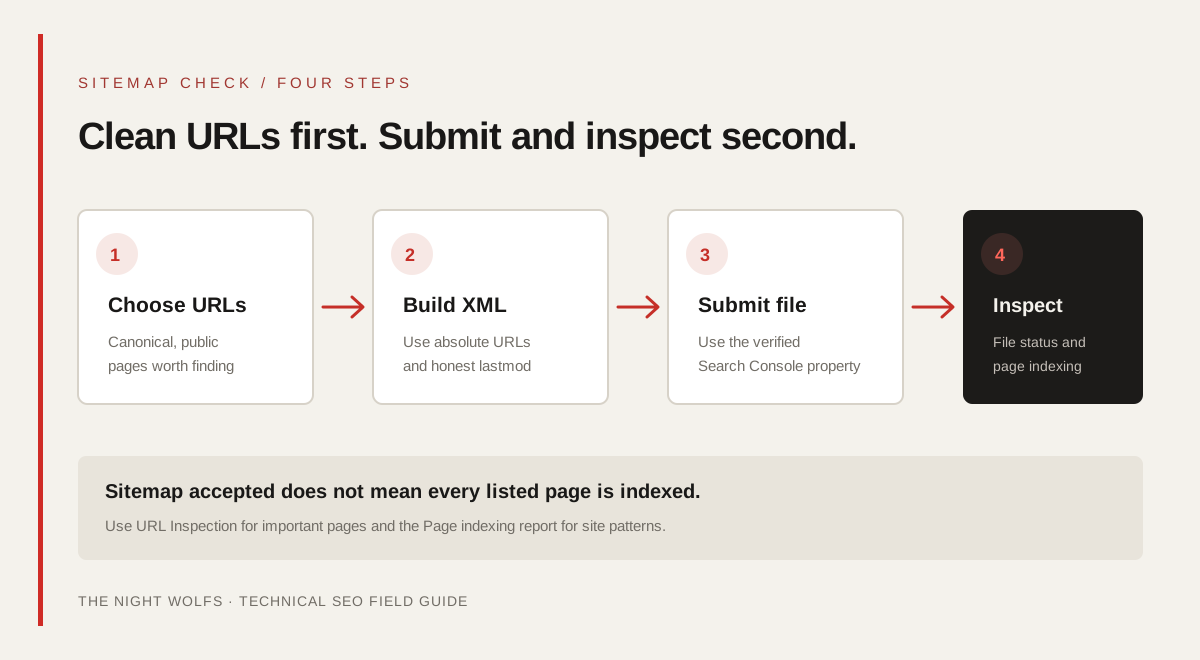
If your website platform or CMS generates a sitemap, review the output before creating a second file by hand. Confirm that it contains the preferred production host and protocol, and that its URL list matches the pages you actually want considered for Search.
For an XML sitemap, use fully qualified absolute URLs such as `https://example.com/services/seo/`, encode the file as UTF-8, and escape special XML characters in tag values. Each URL entry uses a location value. A last-modified value is optional, but only useful when it is maintained accurately.
Google’s documented limit for a single sitemap is 50 MB uncompressed or 50,000 URLs. Larger sites can split their URLs across multiple sitemap files and use a sitemap index. Most small business sites will not need that extra structure.
| File detail | Practical check |
|---|---|
| Location value | Use the full canonical URL with the intended HTTPS host. |
| Encoding | Keep the XML file UTF-8 and escape special characters. |
| File size | Stay within 50 MB uncompressed and 50,000 URLs per sitemap. |
| Large URL inventory | Split into multiple sitemap files and reference them from a sitemap index. |
| Last modified | Set it only when the page had a significant, verifiable update. |
LASTMOD / SIGNAL QUALITY
Keep sitemap dates accurate
The `lastmod` value should reflect the date and time of the page’s last significant update. Google gives examples such as changes to main content, structured data or important links; a routine copyright-year change is not a meaningful page update.
Do not stamp every URL with today’s date just to make the sitemap look fresh. Google says it uses lastmod when the value is consistently and verifiably accurate. Incorrect dates make the file less trustworthy and do not create a reliable indexing shortcut.
Google ignores the `priority` and `changefreq` fields. You do not need to maintain them to signal which pages matter or how often Google should visit. Put effort into useful content, canonical tags, internal links and stable page responses instead.
PUBLISH / SEARCH CONSOLE
Publish the file and submit its public URL
First, make sure the sitemap is accessible at a stable public URL on your site. Open that exact address in a browser or fetch it from a terminal and confirm it returns the XML file, not a sign-in page, HTML error, stale version or redirect to a different host.
In the verified Google Search Console property, open the Sitemaps report and submit the sitemap URL. Submission tells Google where the file is; it does not upload your website’s pages to Google or guarantee that those pages will be indexed. Search Console requires owner permission for sitemap submissions in the report.
You can also list a sitemap URL in robots.txt so crawlers can discover it when they fetch that file. A robots.txt file is public and is not an access-control system. Never use it or a sitemap to protect confidential content; use authentication for private pages.
- Use the sitemap for the correct verified property and canonical host.
- Submit the stable public file URL, not an individual page URL.
- Keep the XML file hosted on your website after submitting it.
- For a robots.txt declaration, use the full sitemap URL and check the public robots.txt response.
TROUBLESHOOTING / FILE OR PAGE?
Separate sitemap errors from indexing issues
If Search Console reports that it could not fetch or parse a sitemap, check the file URL first: confirm the file exists, returns a successful response to Googlebot, uses valid XML and is not blocked by an unexpected server rule. Correct the underlying issue before submitting again.
If the file is processed but an important URL is not indexed, troubleshoot the page rather than repeatedly resubmitting the sitemap. Inspect the exact URL for crawl access, noindex directives, canonical selection, response status and content quality. A sitemap report can show discovery details, but it cannot explain every page-level decision.
For an individual page, use URL Inspection in Search Console to review the indexed information and run a live test. For patterns across many pages, review the Page indexing report. A request to index a URL can prompt another crawl, but does not promise that Google will index or rank it.
| What you see | What to check next |
|---|---|
| Sitemap cannot be fetched | Public URL, server response, redirects, access rules and the correct host. |
| Sitemap has a processing error | XML syntax, encoding, escaped values, duplicate or malformed entries. |
| Sitemap is processed, but a URL is missing from Search | Inspect the page’s crawlability, canonical, noindex status and content. |
| A URL appears in the sitemap but is not indexed | Use URL Inspection and Page indexing; submission alone does not guarantee indexing. |
MAINTENANCE / KEEP IT IN SYNC
Keep the sitemap aligned with the website
A sitemap is most useful when it stays in sync with the live site. After publishing or removing important pages, check that the sitemap updates and that it lists the final canonical URLs. After a redesign or URL change, verify redirects, canonical tags, robots rules, internal links and sitemap entries together.
For a Mumbai agency or local business, a short monthly review can check that the core service pages, genuine location pages and current insights are included, while old redirects and accidental test URLs are excluded. Do not treat the sitemap as a substitute for linking those pages from the rest of the site.
Review Search Console’s sitemap status after material changes, then use the Page indexing report or URL Inspection for the URLs that matter most. Measure indexing separately from search traffic and enquiries; each answers a different question.
- Recheck the sitemap after a redesign, CMS migration or URL change.
- Remove URLs that now redirect, return errors or should not be indexed.
- Keep canonical tags and sitemap entries pointing to the same preferred URL.
- Link important pages from relevant navigation, service pages or articles.
- Use Search Console page tools to verify individual indexing outcomes.
FINAL REVIEW / BEFORE SUBMISSION
Use this checklist before you submit
Run through these checks whenever you publish or replace a sitemap.
- Does the file contain only public, preferred canonical URLs?
- Do the URLs use the correct HTTPS host and return a successful page response?
- Is the sitemap valid UTF-8 XML and within the file limits?
- Does lastmod reflect real, significant changes rather than a forced refresh?
- Is the sitemap file publicly accessible and listed in the right Search Console property?
- Have you checked page indexing separately instead of treating submission as proof of indexation?
THE DETAILS
Questions worth
asking early.
Clear answers about xml sitemap & search console guide before you choose your next step.
Does submitting a sitemap guarantee Google will index my pages?
No. Google describes sitemap submission as a hint. It can help Google discover URLs, but Google decides whether to crawl and index each page.
Which URLs should I put in my sitemap?
List the canonical URLs you prefer to show in search. Avoid duplicate variants, redirects, private pages, errors and URLs that should not be indexed.
Does a sitemap replace internal links?
No. A sitemap helps discovery, while crawlable internal links help people and search engines navigate the site and understand how pages relate.
Should I update lastmod every day?
Only when the page had a significant, verifiable update. Google says it uses lastmod when it is consistently accurate; changing it without a real page update is not a useful shortcut.
What sitemap size does Google support?
A single sitemap can contain up to 50,000 URLs or 50 MB uncompressed. Larger inventories should be split into multiple sitemap files, optionally grouped with a sitemap index.
What does “Success” in the Sitemaps report mean?
It means Search Console processed the sitemap file. It does not confirm that every URL was crawled or indexed. Use URL Inspection and Page indexing to check important pages.
SOURCES & FURTHER READING
- Google Search Central: Learn about sitemaps (opens in a new tab)
- Google Search Central: Build and submit a sitemap (opens in a new tab)
- Google Search Console Help: Sitemaps report (opens in a new tab)
- Google Search Console Help: URL Inspection tool (opens in a new tab)
- Google Search Console Help: Page indexing report (opens in a new tab)