THE SHORT ANSWER
What matters most.
Start with the visitor journey, then connect each important page to relevant pages using ordinary crawlable links and clear anchor text. Build a small, useful topic cluster rather than a web of repeated keyword links. Use a crawl and Search Console’s Links report to spot gaps, then judge improvements by whether people and crawlers can reach the right information—not by a promise of faster rankings.
QUICK REFERENCE
Key takeaways.
- KEY POINT 01Internal links help people navigate and help Google discover pages and understand link context.
- KEY POINT 02Use working HTML links with an href and descriptive wording that accurately names the destination.
- KEY POINT 03Give important pages useful routes from relevant pages; investigate pages with no internal links.
- KEY POINT 04Treat topic hubs as an editorial planning tool, not a guaranteed Google ranking formula.
- KEY POINT 05Review internal links with a site crawl and Search Console’s Links report, then check the live visitor path.
- KEY POINT 06Avoid irrelevant repeated links, keyword-stuffed anchors and large batches of thin pages.
FIELD NOTES / TECHNICAL SEO & CONTENT STRATEGY
Understand what internal links actually do
An internal link points from one page on your website to another page on the same website. It can guide a visitor from a service overview to a detailed service page, from a blog post to a relevant guide, or from an FAQ to the contact page. The best reason to add one is that the next page is genuinely useful at that moment.
Google Search Central explains that links help Google find pages and understand their relevance. For a link to be reliably crawlable, use a regular HTML anchor with an href and descriptive wording, such as a link labelled “SEO services” that points to the SEO page. A button that only changes pages through a JavaScript click handler may not provide the same clear link for crawlers or assistive technology.
A link is not a promise of higher rankings. Internal linking is one part of making a site understandable and navigable; helpful content, technical accessibility, user intent and many other signals still matter.
VISUAL FIELD GUIDE / TECHNICAL SEO & CONTENT STRATEGY
A connected path from question to next action
FIELD NOTES / TECHNICAL SEO & CONTENT STRATEGY
Map a small, useful topic hub
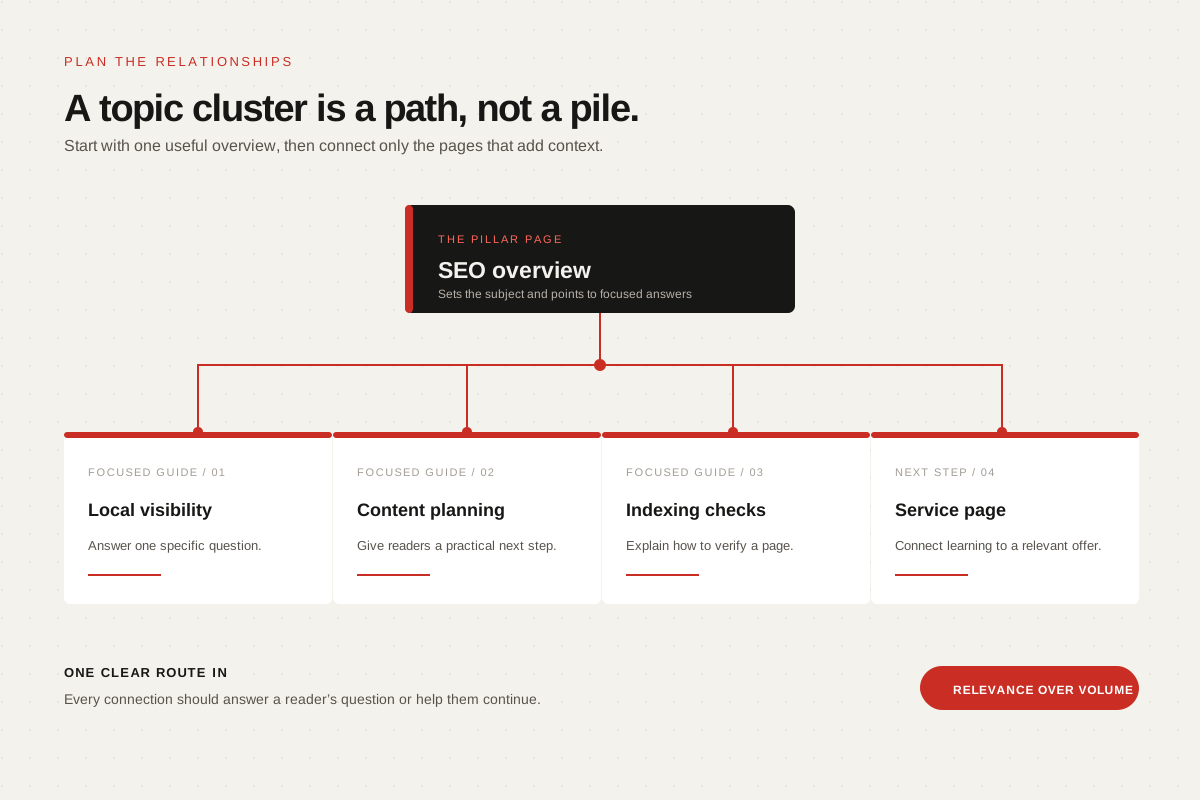
A topic hub is a practical way to plan related pages. One broad page can introduce a subject, while supporting pages answer narrower questions in more depth. Visitors should be able to move from the overview to the detail they need, and back to the overview when that helps.
Start with real customer questions, not a target number of posts. A small business might connect an SEO overview to focused guides on local visibility, content planning and technical indexing. Link between those guides only where a reader is likely to benefit. Do not publish near-duplicate pages just to create more links.
| Page role | Example question | Useful link destination |
|---|---|---|
| Topic overview | What does SEO involve for a small business? | Focused guides and relevant service detail |
| Supporting guide | How should I plan an SEO content cluster? | The overview and a practical next-step resource |
| Service page | What does an SEO engagement include? | Relevant process, portfolio and enquiry information |
| Conversion page | How can I discuss my project? | Only the related service or contact route |
The examples are a planning pattern, not a required “silo” structure. A flatter site can work well when navigation is clear and important information is easy to reach.
FIELD NOTES / TECHNICAL SEO & CONTENT STRATEGY
Write anchor text that sets the right expectation
Anchor text is the visible wording of a link. Google recommends making it descriptive, concise and relevant to both the current page and the destination. “Read our local SEO checklist” tells a reader more than “click here”; “services” repeated everywhere tells them very little.
Use natural wording that reflects the destination. Do not repeat the same exact-match phrase on every page or add links where they interrupt the sentence. When an image is the link, its alternative text can serve as the anchor context, so describe the linked destination rather than the image’s decoration.
Before publishing, read the anchor text by itself. Would a visitor understand what opens? Then follow the link: does the page deliver what the anchor promised?
- Good: “Compare our local SEO checklist” links to the checklist.
- Weak: “Click here” gives no useful destination context.
- Misleading: “Affordable SEO services” should not point to an unrelated blog article.
- Overdone: repeating the same keyword anchor in every paragraph makes the page harder to read.
FIELD NOTES / TECHNICAL SEO & CONTENT STRATEGY
Find orphan pages and broken paths
An orphan page has no internal links pointing to it. A page may still appear in a sitemap or be discovered elsewhere, but visitors can struggle to find it through the site. Important service pages, original research and useful guides should have sensible routes from relevant navigation or content.
Crawl the website with a site crawler and review its internal-link report. Compare the discovered pages with the sitemap and your intended page list. Look for orphan URLs, broken internal links, redirects that could point directly to the final page, and important pages buried several steps away from a logical starting point.
Do not “fix” every low-link page by adding sitewide footer links. Some utility pages need not be promoted across the whole site. Prioritise useful public pages visitors should actually discover.
- Can a visitor reach each key service, policy and contact page from an appropriate place?
- Do contextual article links lead to the exact guide they describe?
- Are any internal links broken, redirected or pointing to a non-canonical duplicate?
- Are important pages discoverable without relying only on a sitemap?
FIELD NOTES / TECHNICAL SEO & CONTENT STRATEGY
Use Search Console as one view of the link structure
In Google Search Console, open the Links report and review “Top internally-linked pages.” Google’s help documentation describes using this view to check whether core pages are linked within your site, inspect which pages link to a selected URL and understand how visitors can move between pages.
Treat this as a diagnostic view, not a complete site crawl or a scorecard. Pair it with a crawl of your own pages and a manual check of the visitor experience. If a page is missing from the report, verify that it is live, internally linked with a crawlable href, and part of the site structure you intended.
When a change is important, inspect the destination URL in Search Console and confirm the live page returns the intended content. Search Console reporting updates over time; a link appearing in a report does not guarantee indexing or rankings.
| Check | What to review | What to do next |
|---|---|---|
| Internal links report | Which pages receive links from your own site? | Compare important services and guides with your intended structure. |
| Crawl report | Are there orphan, broken or redirected internal destinations? | Add relevant links or update the source to the final destination. |
| Live page test | Does the destination load and show the expected canonical page? | Fix access, redirects or duplicate-URL issues before measuring. |
| Analytics and enquiries | Do visitors continue to useful pages and take relevant actions? | Improve the path if people drop at an unclear or irrelevant link. |
FIELD NOTES / TECHNICAL SEO & CONTENT STRATEGY
Run a focused internal link audit
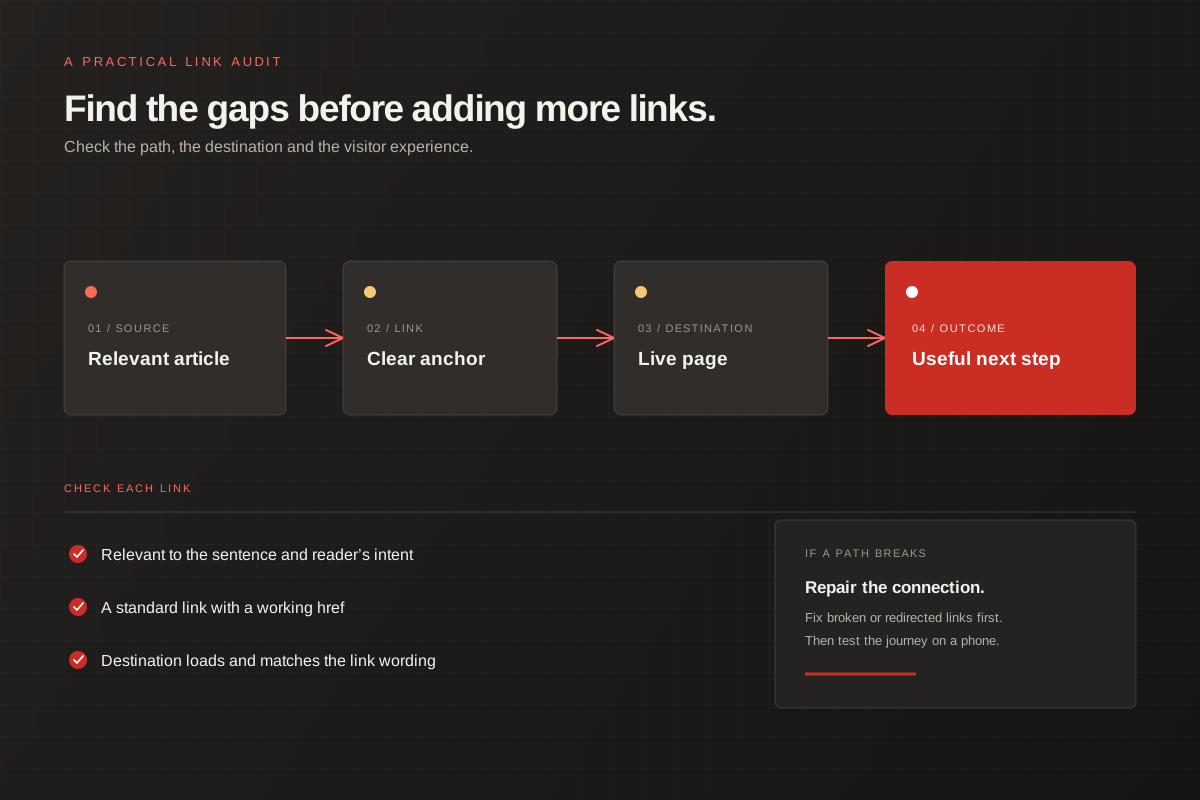
A useful audit starts with a short list of priority pages—not an arbitrary target for links per page. Include your main service pages, the guides that answer important customer questions and the key contact path. Check how each page can be found from the homepage, navigation, related pages and the Insights library.
Record the source page, destination, anchor wording and reason for the link. Remove a link only if it is broken, misleading, irrelevant or no longer useful. When replacing a URL, update the internal source to the current destination rather than leaving an avoidable redirect chain.
After the change, open the source on desktop and mobile, follow every new link, and confirm the destination is the right live page. Keep the audit notes so the next content update can preserve a consistent structure.
VISUAL FIELD GUIDE / TECHNICAL SEO & CONTENT STRATEGY
A practical review loop for internal links
FIELD NOTES / TECHNICAL SEO & CONTENT STRATEGY
Avoid shortcuts that make a site harder to use
More links are not automatically better. A crowded block of exact-match anchors, repeated footer keywords or unrelated cross-links can make a page feel manipulative and make it harder for visitors to choose a path. Keep links close to the information that explains why the destination matters.
Do not build a large network of thin, overlapping location pages just to connect them. For Mumbai-area businesses, local pages should reflect real service coverage and provide useful, distinct information. If two pages answer the same question, improve or consolidate the content rather than inventing a link pattern to disguise duplication.
Finally, remember that internal links are only one part of a useful website. A clear path cannot compensate for inaccurate information, a slow or inaccessible page, or a service offer that does not match what a visitor needs.
THE DETAILS
Questions worth
asking early.
Clear answers about internal linking for seo before you choose your next step.
Do internal links help SEO?
They help search engines discover pages and understand link context, and they help visitors navigate. Internal links alone do not guarantee indexing, improved rankings or a particular timeline.
How many internal links should a page have?
There is no universal target that suits every page. Add links where they help a visitor reach relevant information, and keep the page readable rather than pursuing a fixed count.
What is an orphan page?
It is a page with no internal links pointing to it. A crawl can help identify these pages; decide whether each one should be linked, consolidated or intentionally kept out of the main visitor journey.
What should good internal link text say?
Use concise wording that accurately describes the destination in the context of the current page. Avoid generic phrases and repeated keyword anchors that do not read naturally.
Does Search Console show every internal link?
The Links report is useful for reviewing internal linking, but it should not replace crawling your own site and manually checking important visitor paths.