THE SHORT ANSWER
What matters most.
First decide whether the URL should be searchable. If it should, check the exact robots.txt file for its host and protocol, review the matching rule, then inspect the live page for access, noindex and canonical issues. If it should not appear, do not rely on robots.txt alone: Google may still know a blocked URL, and cannot see a noindex tag on a page it cannot crawl. URL Inspection and the Page indexing report help diagnose the next step, but requesting a recrawl does not guarantee indexing.
QUICK REFERENCE
Key takeaways.
- KEY POINT 01A robots.txt rule controls crawling, not access to private information or guaranteed removal from search.
- KEY POINT 02Google may know and index a blocked URL from links even though it cannot crawl the page content.
- KEY POINT 03If a public page should appear, inspect the robots.txt file for the exact protocol, host and port serving that URL.
- KEY POINT 04Google cannot see a noindex directive on a page blocked from crawling; choose the right control for the intended outcome.
- KEY POINT 05Use URL Inspection to compare Google’s indexed view with a live test, then check canonical and page response details.
- KEY POINT 06A robots warning can be intentional; do not remove restrictions across the whole site without reviewing their purpose.
- KEY POINT 07A successful live test or indexing request is not a guarantee that Google will index or rank the page.
FIELD NOTES / TECHNICAL SEO & INDEXING
Read the Search Console status before editing
The Page indexing report groups URLs by how Google has discovered and processed them. A robots.txt status is useful evidence, but it does not tell you by itself whether the page should be indexed. Compare the affected URL with the intended site structure and the exact Google-selected canonical before changing a rule.
“Blocked by robots.txt” means Google’s crawler is disallowed from fetching that URL by a robots.txt rule. This can be correct for areas that do not need search visibility. If the URL is an important public service page or article, review the rule and the URL’s other indexing signals.
“Indexed, though blocked by robots.txt” means Google knows the URL even though it cannot crawl it under the current rule. Google explains that a blocked URL can still appear in Search if it is linked from other places; the URL and publicly available link text may be shown. Because Google cannot fetch the page, it cannot inspect the current page content or read its noindex directive.
| Search Console status | What it usually signals | First question |
|---|---|---|
| Blocked by robots.txt | A robots rule prevents Google from crawling the URL. | Should this public page be crawlable? |
| Indexed, though blocked by robots.txt | Google knows the URL but cannot fetch its current content. | Is the restriction intentional, and should the URL remain discoverable? |
| Excluded by noindex | Google crawled the page and found a noindex directive. | Is exclusion intended? |
| Discovered or crawled, currently not indexed | The issue is not necessarily a robots block. | What does URL Inspection show about content, canonical and indexing? |
FIELD NOTES / TECHNICAL SEO & INDEXING
Know when to use robots.txt and when to use noindex
Robots.txt tells compliant crawlers which URLs they may request. It is not a password, privacy control or reliable way to hide confidential information. Google’s documentation notes that a URL disallowed in robots.txt can still be indexed from external links, sometimes with the URL or link text shown.
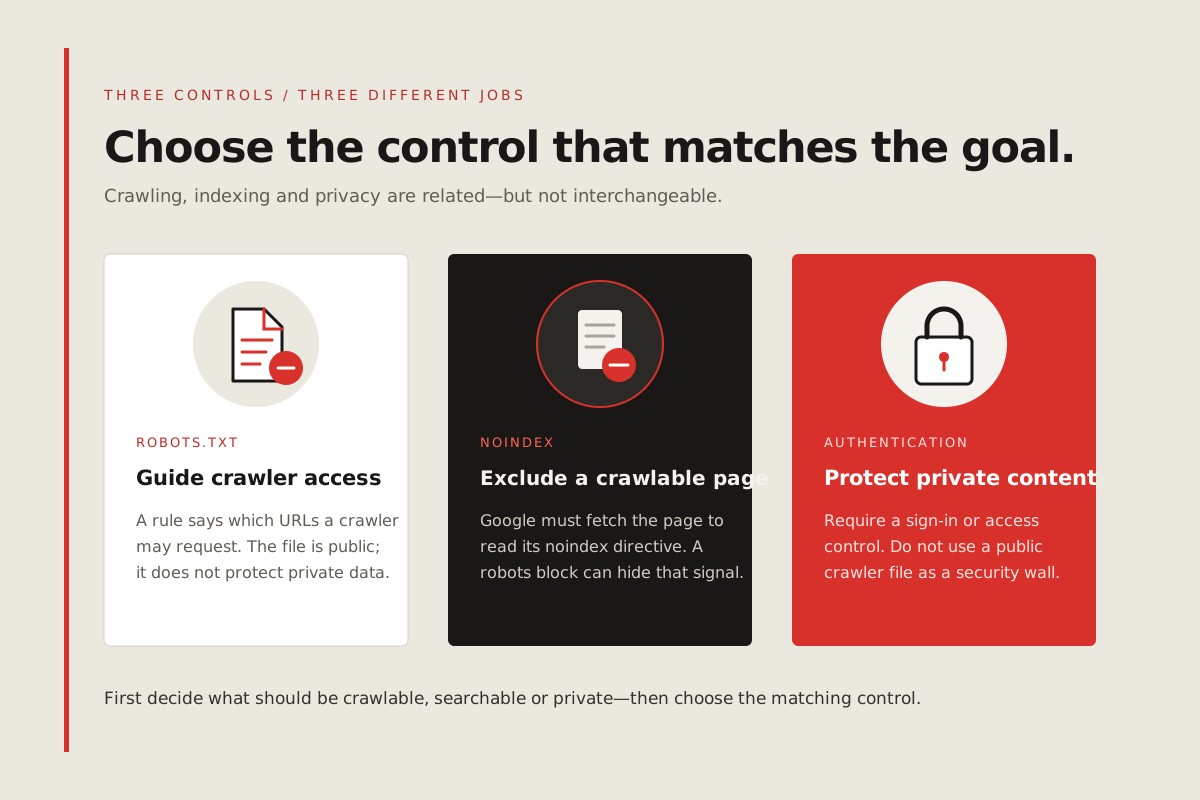
If a page should stay accessible to visitors but should not appear in Search, use a noindex directive and allow Google to crawl the page so it can read that directive. If the URL is blocked in robots.txt, Google cannot see or respect a noindex tag on the page. If the content is private or sensitive, protect it with authentication or another access-control mechanism instead of relying on a crawler rule.
A block may still be appropriate for crawl management or areas that do not need indexing. The important point is to match the control to the goal: crawl restriction, search exclusion and access protection are different jobs.
- Crawl restriction: use a carefully scoped robots.txt rule when crawlers should not fetch a URL pattern.
- Search exclusion for an accessible page: allow crawling so Google can see its noindex directive.
- Private information: require authentication or access control; robots.txt is publicly readable.
- Public page intended to rank: confirm that the crawler can fetch the page and see its content.
FIELD NOTES / TECHNICAL SEO & INDEXING
Check the correct robots.txt file and matching rule
Open the robots.txt file at the root of the exact site variant in the affected URL, such as https://example.com/robots.txt. Google applies a robots.txt file only to the host, protocol and port where that file is hosted. A rule on the HTTPS non-www site does not automatically describe the HTTP or www version.
Read the complete file, not just one line. Identify which user-agent group applies and whether a Disallow pattern matches the affected path. Robots rules are path-sensitive and case-sensitive. Do not copy a generic “allow everything” file over existing rules: that can expose crawlable areas that were intentionally restricted.
Google expects robots.txt to be a UTF-8 plain-text file in the site’s top-level directory. Make sure the file itself is reachable and returns the intended rules. If a hosting or CDN setting serves a different file, HTML error page or redirect unexpectedly, fix that response before judging the rule.
- Use the full canonical URL from Search Console, including http or https and www or non-www.
- Open that URL’s root-level robots.txt and check its response and contents.
- Match the affected path against the applicable user-agent group and rule.
- Preserve intentional restrictions for admin, internal search or other low-value URL patterns.
- After an edit, test only the intended paths and confirm other site areas remain covered correctly.
FIELD NOTES / TECHNICAL SEO & INDEXING
If a public page should be searchable, verify every signal
Removing a robots block is only one part of making a page eligible. Check the exact public URL in Search Console’s URL Inspection tool. Review whether crawling is allowed, whether the live page fetch succeeds, whether indexing is allowed, and which canonical Google selected for the indexed version.
On the website, confirm that the page returns a successful response, has no unintended noindex tag or X-Robots-Tag header, and points to the intended canonical URL. Add a descriptive internal link from a relevant page and include the canonical URL in the XML sitemap. A sitemap helps discovery but does not override a robots block or guarantee indexing.
For a URL that was blocked, retest after the robots change is live. If it is important and now eligible, request indexing once through URL Inspection or validate the related Page indexing issue. Google may need to recrawl the URL; a submitted request is not a promise of a specific timing or outcome.
| Check | Expected result for a public page |
|---|---|
| Robots access | The URL is not disallowed by the applicable rule. |
| Page response | Google can fetch the canonical URL successfully. |
| Indexing directive | No unintended noindex directive or blocking response header. |
| Canonical | The page declares and internally links to the intended canonical URL. |
| Discovery | Relevant internal links and the sitemap point to the canonical URL. |
FIELD NOTES / TECHNICAL SEO & INDEXING
If a page should not appear, avoid conflicting instructions
For an accessible page that should not be indexed, use the appropriate noindex directive and leave the page crawlable long enough for Google to read it. Verify the live response in URL Inspection after the change. A robots block can prevent Google from seeing the very directive intended to exclude the page.
For private content, use authentication. Do not assume a robots.txt entry keeps a URL secret; the file is public and external links can reveal a blocked address. If a URL has already appeared in results and needs urgent removal, use Google’s removal tools as a temporary step while correcting the underlying access or indexing setup.
Keep the decision documented. Many sites intentionally block some URLs, and Google’s Page indexing report notes that a robots exclusion can be expected. A warning is not a reason to remove every crawl restriction.
FIELD NOTES / TECHNICAL SEO & INDEXING
Use Search Console for diagnosis, not as a guarantee
The Page indexing report provides patterns and examples across a site. For one specific page, Google recommends URL Inspection. The indexed result shows what Google last processed; a live test checks whether the current URL might be indexable. A live test cannot predict every quality, policy or canonical decision, and an eligible URL is not guaranteed to appear in Search.
After a real fix, use the report’s validation workflow when appropriate and check back as Google processes the changed URLs. Do not submit the same URL repeatedly or treat a submitted request as proof that a page is indexed. Check the indexed version again after Google has recrawled it.
If the status is not about robots.txt, follow that exact reason. Duplicate canonical signals, a noindex tag, a redirect, a soft 404, server access problems and a page that Google has not selected to index require different investigations.
- Use the Page indexing report to identify affected groups and sample URLs.
- Use URL Inspection for the precise indexed and live status of an important URL.
- Check the Google-selected canonical in indexed data; a live test cannot settle that choice.
- Validate only after the relevant issue has been corrected across the affected URL set.
- Track the final indexed state separately from the fact that a request was submitted.
FIELD NOTES / TECHNICAL SEO & INDEXING
A practical checklist before changing robots.txt
Use this short decision sequence before editing a live file. It helps prevent a targeted visibility issue from turning into a broader crawl or privacy problem.
- Confirm the exact affected URL and whether it is a canonical, public page.
- Decide whether the page should be crawlable, indexable or access-restricted.
- Inspect the root robots.txt for that exact host, protocol and port.
- Check noindex, canonical, HTTP response and internal links alongside the robots rule.
- Change only the matching rule, test the intended URL and recheck the indexed result later.
THE DETAILS
Questions worth
asking early.
Clear answers about google search console indexing before you choose your next step.
Does blocked by robots.txt always mean a website error?
No. Some URLs are intentionally blocked. Check whether the affected URL is an important public page before changing the rule.
Can a robots.txt-blocked URL still appear in Google?
Yes. Google may discover a disallowed URL through links and show the URL or publicly available link text even though it cannot crawl the page content.
Can I use noindex on a page blocked by robots.txt?
Google cannot crawl the blocked page to see its noindex directive. If a page should be excluded but remain accessible, allow crawling so Google can read noindex. Use access controls for private content.
Where should robots.txt be located?
Place it in the top-level directory for the exact host and protocol, for example https://example.com/robots.txt. Rules apply to that host, protocol and port.
Does Request Indexing guarantee that Google will index my page?
No. It asks Google to recrawl the URL. Google decides whether and when to crawl, index and show the page.