THE SHORT ANSWER
What matters most.
Use Google Search Console’s Performance report to compare clicks, impressions, click-through rate and average position for the same type of search and comparable time periods. Segment by query, page, device and country before deciding what to change. If a relevant page earns fewer clicks than comparable results, review the title link and snippet for clarity, then check that the landing page delivers the promise. Google can rewrite title links and generate snippets from page content, so no edit guarantees a particular display, CTR or ranking.
QUICK REFERENCE
Key takeaways.
- KEY POINT 01CTR is clicks divided by impressions; it is a diagnostic metric, not a universal scorecard.
- KEY POINT 02Compare similar queries, pages, devices and search types instead of judging one blended site average.
- KEY POINT 03Read CTR alongside impressions and average position; query mix can change the average.
- KEY POINT 04Google may generate or rewrite the title link and snippet shown for a search.
- KEY POINT 05Make the result preview accurate and useful, then ensure the landing page fulfills its promise.
- KEY POINT 06Measure meaningful visits and enquiries separately; more clicks do not automatically mean better leads.
PERFORMANCE REPORT / FOUR METRICS
Understand what the CTR number measures
In Google Search Console’s Search results Performance report, clicks count times a user clicked a result from the site, impressions count when a result from the site is shown under Google’s counting rules, CTR is clicks divided by impressions, and average position summarizes the position of the topmost result from the site. Each metric describes a different part of search visibility.
CTR answers a narrow question: among the recorded impressions in this selected report view, what share led to clicks? It does not explain why the result appeared, whether the visitor was a good fit, whether the site loaded, or whether an enquiry followed. Use it to choose what to inspect next, not as a standalone measure of SEO success.
The chart and table can also aggregate data differently. The chart is grouped at the property level, while table rows depend on the selected dimension. Search Console explains that totals can differ when property-level and page-level aggregation are compared. A row total is not always expected to equal the chart total.
| Metric | Useful question |
|---|---|
| Impressions | Is the page appearing for the searches we want to serve? |
| Clicks | Are people selecting a result from Google Search? |
| CTR | Are impressions turning into clicks for this particular query and page mix? |
| Average position | How visible was the topmost result on average in this report grouping? |
REPORT SETUP / MATCH THE CONDITIONS
Set up a fair comparison before judging CTR
Choose the Search results Performance report, the right search type, and a date range that fits the question. Compare like with like: the same page or query group, similar-length periods, and the same device or country filter when those factors matter. A sitewide average can move simply because the mix of pages or searches changed.
Use the report’s query, page, country, device, search appearance and date dimensions to narrow the investigation. For example, a page may have a different mix of impressions on mobile than desktop. Separate that view before deciding that its title is the problem.
Avoid drawing a firm conclusion from the newest partial data or a very short period. Google notes that some recent data may be preliminary. Search demand, holidays, weekday patterns, campaigns and site changes can also affect a comparison. Record the selected filters so a later review uses the same lens.
- Keep the search type and date range consistent across comparisons.
- Filter to a page or related query set before changing sitewide titles.
- Compare device and country segments when the audience or layout differs.
- Note recent site changes and seasonal factors alongside the report dates.
QUERY / RESULT / PAGE
Read the query, result preview and landing page together
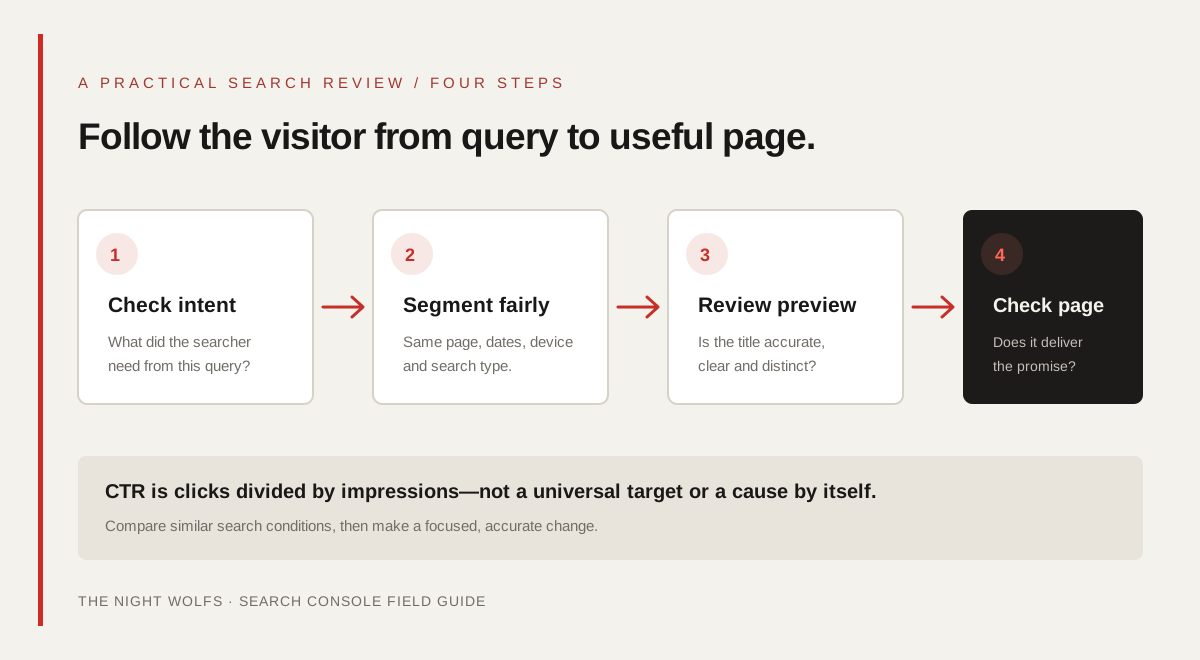
A useful review starts with the search behind the impression. Is the query asking for a local provider, a definition, pricing, a comparison or a quick answer? Does the page genuinely answer that need? If the result appears for an adjacent topic, rewriting the title to attract more clicks may bring visitors who will not find what they came for.
Next, inspect the URL’s current title element, visible page heading and opening content. Google generates title links automatically and may use multiple page signals; the title element is important, but the search result is not guaranteed to display it exactly as written. Snippets are primarily created from page content, although Google may use the meta description when it provides a more accurate summary.
This is especially useful for a Mumbai service page. Make the service, audience and genuine service area clear where they are relevant. Do not add a neighbourhood, discount, result or availability claim that the page cannot substantiate. Accuracy protects the visitor’s expectation and makes the page easier to evaluate.
OPPORTUNITY / INVESTIGATE THE PATTERN
Find pages worth reviewing without chasing a magic CTR
There is no single CTR target that applies to every query, position, device, industry and result format. Instead, look for a pattern that gives you a specific question to investigate. Compare the same page’s query groups over time, or compare closely related pages that serve similar intent and have similar visibility.
Use the table below as a diagnostic prompt, not as proof of a cause. A low CTR may reflect intent mismatch, a lower average position, a crowded result page, changing query mix or an unclear preview. Check the page and query evidence before editing.
| Report pattern | What to inspect next |
|---|---|
| Relevant impressions, but fewer clicks than a comparable page | Compare query intent, average position, device and the actual result preview. |
| CTR changes while impressions or average position also change | Check whether the query mix, visibility or search appearance changed before attributing the difference to the title. |
| A page appears for queries it does not answer well | Improve the page’s focus or internal links; do not promise the unrelated topic in its title. |
| Mobile and desktop views differ | Compare the query mix and result context; then review the mobile page experience as well as the snippet. |
| A short date range looks unusually strong or weak | Check for preliminary data, seasonality, campaigns or one-off events before changing the page. |
Prioritize pages that matter to the business and have a clear, fixable mismatch. A small number of relevant enquiries can be more valuable than a broad increase in unqualified clicks.
SEARCH PREVIEW / CLEAR AND ACCURATE
Improve the title and snippet without clickbait
Google recommends unique, descriptive and concise title text that reflects the page. Make the main service or subject easy to understand, include a location only when it genuinely matters, and avoid repetitive keywords or boilerplate titles across many URLs. There is no need to force a fixed character count; display can vary by device and search context.
Write a useful meta description as a clear summary, but remember that Google may choose snippet text from the page instead. Make the opening content specific enough to answer the likely question. Keep price, service availability, credentials and performance claims accurate and current.
After changing a title or description, inspect the rendered page and its canonical URL. Google may need to recrawl the page before a change is reflected, and it may still select different wording for a particular search. Do not keep rewriting a page every few days based on noisy data.
- Give each important page a distinct title that describes its actual purpose.
- Use plain language that tells the right visitor what the page offers.
- Write a page-specific meta description that summarizes real content and next steps.
- Keep the visible heading and page content consistent with the search preview.
- Avoid clickbait, unsupported promises, keyword lists and location stuffing.
LANDING PAGE / FULFIL THE PROMISE
Make the page useful after the click
A search preview is a promise about what the visitor will find. Once they arrive, make the service, process, proof and next step easy to understand. For a local business, explain the real coverage area without implying an office in every suburb. Link to relevant service details and give visitors a clear way to enquire.
Do not treat CTR improvement as the finish line. Search Console measures Google Search impressions and clicks; it does not confirm that the visitor read the page, contacted the business or became a customer. Use analytics and enquiry records—respecting the visitor’s consent choices—to assess whether the traffic is useful.
If clicks rise but qualified enquiries do not, review audience fit, page clarity, contact friction and lead handling rather than simply trying to attract more clicks. The goal is a relevant search result followed by a helpful, honest page.
MEASUREMENT / LEARN, THEN ADJUST
Measure changes carefully and avoid false certainty
Before editing, save the URL, query or page filters, date range, device and the current title and description. Make a focused change, note when it went live, and allow time for Google to recrawl the page. Then compare a suitable period using the same filters and look at impressions, clicks, CTR and average position together.
A before-and-after change is not automatically proof that the edit caused the outcome. Search demand, ranking changes, competition, page changes and seasonality may all contribute. If several page elements change at once, it is harder to learn which one mattered.
For the website side of the journey, compare Search Console clicks with the relevant landing-page traffic in GA4 only with the understanding that they are different measures. A click is not automatically a recorded analytics session or a qualified enquiry. See our guide to Search Console and GA4 for a fuller comparison.
- Save the report filters and baseline before making an edit.
- Change one clear issue at a time where practical.
- Wait for recrawling and compare equivalent time periods.
- Track qualified enquiries separately from search clicks.
- Keep the change if it improves clarity and visitor fit, even when rankings do not move immediately.
MONTHLY REVIEW / QUICK CHECKLIST
Use this checklist for a monthly CTR review
A consistent review helps you find useful edits without reacting to every fluctuation.
- Did I select the right search type, dates, page and query filters?
- Am I comparing similar searches, devices and average positions?
- Does the query fit the page and the service the business actually provides?
- Does the title accurately describe the page in clear, specific language?
- Does the page content support the promise in the title and snippet?
- Have I checked clicks and enquiries separately instead of calling both “traffic”?
- Have I recorded the change and allowed time for Google to recrawl it?
THE DETAILS
Questions worth
asking early.
Clear answers about google search console ctr guide before you choose your next step.
What is a good CTR in Google Search Console?
There is no universal target. CTR varies by query intent, position, device, country, search appearance and the mix of pages included. Compare similar queries and pages over comparable periods, then investigate a specific mismatch rather than chasing a generic benchmark.
Does improving CTR raise my Google ranking?
A clearer result can help the right searcher understand a page, but a title or snippet edit does not guarantee higher rankings or more clicks. Search visibility depends on many factors, and Google can choose different result wording for different searches.
Why do Search Console chart totals differ from table rows?
The report can aggregate chart data at the property level while table rows depend on the selected dimension, such as pages or queries. Google documents that these aggregation differences can make totals differ.
Does Google always show my meta description?
No. Google primarily creates snippets from page content and may use the meta description when it is a more accurate summary for a search. Write a useful description, but make sure the page itself clearly explains its topic.
Is Search Console average position my exact rank?
No. It is an average of the topmost result from your site for the selected report data. Search results vary by query, place, device and context, so the metric is not a fixed position every visitor sees.