THE SHORT ANSWER
What matters most.
Treat YouTube SEO as a viewer-matching problem, not a tag checklist. Start with a search question that fits your service, make the title, thumbnail and video agree, and give the viewer a useful next step. YouTube says Search considers how a video’s title, description and content match a query, along with engagement for that search; it is not simply a most-viewed list. Google video results have separate eligibility requirements, including an indexed, visible watch page and a stable thumbnail. These practices support discovery but do not guarantee views, indexing, rankings or leads.
QUICK REFERENCE
Key takeaways.
- KEY POINT 01Begin with the questions customers actually ask, then choose one clear search intent for each video.
- KEY POINT 02Make the title, description, thumbnail and video deliver the same accurate promise.
- KEY POINT 03YouTube says Search considers query relevance and engagement; tags are not a substitute for useful content.
- KEY POINT 04Mention Mumbai or a neighbourhood only when it genuinely helps explain the video or service area.
- KEY POINT 05Google video features have separate eligibility rules, including an indexed page, visible video and stable thumbnail.
- KEY POINT 06Compare similar videos by traffic source, watch time and meaningful next steps instead of chasing a universal benchmark.
RESEARCH / START WITH PEOPLE
Map the questions your customers already ask
Start with enquiry forms, sales calls, support messages and conversations with your team. Look for questions people ask before they compare, book or buy. A local service business might explain how its process works, what a first consultation covers or how a customer can prepare. Choose a subject the business can answer accurately and show clearly.
Use YouTube search suggestions and related results as prompts for further research, not as proof that a topic has a particular search volume. Review what a viewer sees for the phrase: are the results tutorials, comparisons, demonstrations or quick answers? That format helps clarify the intent your video should serve.
Keep a short brief for each idea: the viewer, their question, the answer the video will provide and a reasonable next step. If the idea needs several unrelated answers, split it into a useful series rather than asking one video to cover every service.
- Choose questions from real customer conversations, not only from trend lists.
- Check current YouTube results to understand the type of answer viewers expect.
- Prioritise subjects where the business has relevant experience or evidence.
- Record the intended viewer and next step before production begins.
SEARCH INTENT / ONE PROMISE
Match each video to one search intent
YouTube’s guidance says Search looks at how well the title, description and video content match a viewer’s search, as well as engagement for that search. Search results are not simply ordered by total views. Make the subject clear in the video itself, then use its title and description to describe that same subject in language a viewer would recognize.
For example, a video about reading a campaign report should not be titled as a complete guide to every part of digital marketing. A focused topic gives the creator a clearer script and helps a prospective viewer decide whether the video answers their question.
Avoid building separate videos or pages that repeat the same thin answer with only a different neighbourhood or keyword. Add a new location reference when the service coverage, example or customer information is genuinely different—not just to multiply URLs or titles.
| Planning question | A clear answer |
|---|---|
| Who is this for? | Name the audience by their need, not by everyone who might watch. |
| What will they learn? | Describe one useful answer, demonstration or comparison. |
| What should happen next? | Offer a related service page, checklist or follow-up only when it fits. |
The table is a planning prompt, not a ranking formula. If a video cannot be summarized in one accurate sentence, refine its scope before writing the title.
TITLE & THUMBNAIL / SET THE RIGHT EXPECTATION
Make the title, thumbnail and description agree
A title should tell a potential viewer what the video covers without hiding the answer behind a vague tease. Keep the most important words near the beginning when they make the subject easier to understand. Include “Mumbai” or a specific area only if the local setting is relevant to the advice, service or example.
Use a custom thumbnail that is readable on a phone and accurately represents what appears in the video. A simple subject, clear contrast and a few legible words can communicate more than a crowded design. Do not imply a result, customer endorsement or dramatic event that the video does not contain.
Write a description that adds context, such as the steps covered, an important limitation and a link to the most relevant resource. YouTube says tags are primarily useful for common spelling variations and are not an important discovery lever. Put the planning effort into the topic, clear packaging and the viewer’s experience instead.
- Use an accurate, specific title rather than a string of repeated keywords.
- Design a thumbnail that remains understandable at small sizes.
- Make the opening of the video fulfil the title’s promise.
- Add a concise description and a relevant next-step link.
- Use tags sparingly for meaningful spelling variants; do not treat them as a shortcut.
VIEWING EXPERIENCE / HELP PEOPLE FOLLOW
Make the video easy to follow and use
Give the viewer a quick orientation, then move into the answer. Remove long introductions that postpone the subject. When the topic needs several parts, organize the explanation in a logical order and use accurate timestamps or chapters where they help someone navigate.
Review captions instead of assuming automatic text is perfect. Correct names, service terms and local references, and make sure important meaning is not carried only by on-screen text or sound. Use clear speech, readable graphics and a pace that gives viewers time to understand each point.
Choose one next action that fits the video. Someone watching an explainer may want a deeper guide; someone comparing a service may want to inspect the relevant service page. Avoid stacking multiple unrelated prompts or promising an outcome that the business cannot guarantee.
LOCAL RELEVANCE / BE SPECIFIC WHEN IT MATTERS
Add Mumbai context without keyword stuffing
A Mumbai audience may benefit from examples that explain a real local process, service area or customer situation. Mention a neighbourhood when the video actually covers it—for example, a service team’s genuine coverage or a project that took place there. The location should make the information more useful, not merely add another search phrase.
Do not rely on a channel location setting as a substitute for local relevance. YouTube’s help guidance says the country or region setting is not used to inform recommendations. Build the video around the needs of the people you serve and describe the place only where it is accurate.
Check that every local claim matches the business’s real operating area and experience. Avoid invented project examples, implied customer results or repeated location variations that do not offer distinct information.
- Use the city or area when it describes the actual audience, service or example.
- Keep service coverage and client references factual and current.
- Do not repeat Mumbai or neighbourhood names in every title and description.
- Do not present a concept or hypothetical as a real client result.
GOOGLE VIDEO SEARCH / BUILD A USEFUL WATCH PAGE
Give important website videos a useful, discoverable home
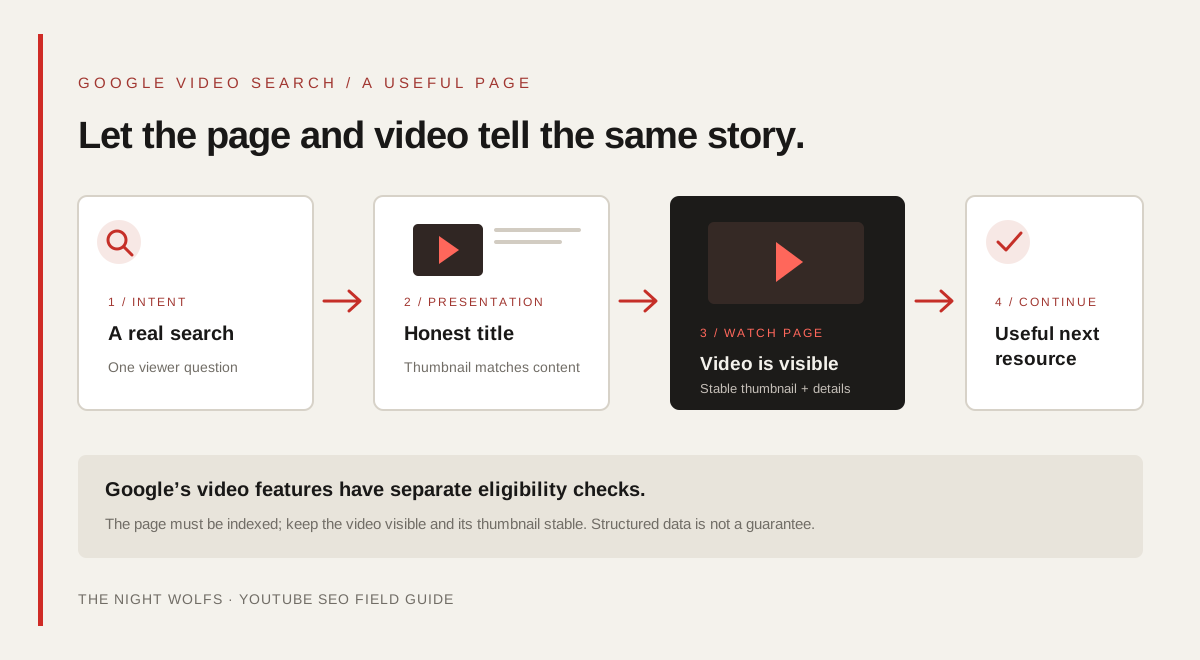
Google’s video SEO guidance has additional eligibility requirements beyond publishing a YouTube video. The page must be indexed and performing in Search, the video must be embedded and visible, and its thumbnail must be valid and available at a stable URL. A video hidden behind other elements or loaded only after a visitor action can be difficult for Google to discover.
A dedicated watch page makes sense when watching one video is the main reason someone visits. Give that page a unique title and description, a visible player and useful information that supports the video. A blog post where an embedded video is only one supporting element is not a dedicated watch page for Google’s video features, though the page may still be useful as a regular search result.
If you add VideoObject structured data, describe the video people can actually see: its name, description, thumbnail and publication details. Keep the information consistent with the page. Markup and video sitemaps can help Google understand or discover video content, but neither guarantees indexing, a video result or a ranking.
- Make the video visible in the rendered page and accessible without a login barrier.
- Use a stable thumbnail URL and page details that match the video.
- Create a dedicated watch page when the video is the page’s primary purpose.
- Use structured data only when it accurately represents visible content.
- Check important URLs and video indexing reports in Search Console after launch.
INTERNAL LINKS / CONTINUE THE ANSWER
Connect the video to a relevant website next step
A useful video can link to a page that continues the same subject: a service explanation, a detailed guide, a product page or an enquiry form. Send viewers to the closest helpful destination rather than defaulting every description to the homepage.
On your own site, link to an important watch page from related service pages and articles using clear anchor text. The video page should add something for people who watch and people who prefer to read. Avoid a set of thin pages that repeat the video title but offer no extra context.
If you use campaign parameters to understand visits from YouTube, keep them consistent and test that analytics reports the intended source. Respect the site’s consent settings. Attribution can be incomplete when a viewer watches on one device and later contacts the business through another channel, so report what the data can support.
The related guides below connect YouTube planning with the broader video strategy, on-site SEO and content journey.
MEASUREMENT / LEARN FROM SIMILAR VIDEOS
Measure discovery, viewing and useful actions
In YouTube Analytics, review how thumbnails become views and watch time, then look at traffic source and audience retention. A click-through rate is not meaningful in isolation: compare videos with similar formats, topics, audiences and discovery surfaces. YouTube notes that results vary, so avoid treating a general range as a target for every channel.
For a website video, use Search Console to review the page’s indexing and relevant video reporting where available. Analytics can help connect an opted-in website visit to a next step, but it cannot always attribute a later call, direct message or cross-device enquiry to the original video.
YouTube says there is no requirement to upload daily or weekly for long-term performance; it encourages creators to focus on knowing their audience and producing quality over quantity. Set a publishing pace your team can sustain, then use evidence from viewers and customers to choose the next topic.
- Compare similar videos and traffic sources over a consistent time period.
- Review impressions, click-through, watch time and retention together.
- Track relevant page visits and qualified enquiries where measurement allows.
- Use comments and customer questions to improve the next video.
- Do not treat a view, tag, upload frequency or schema field as a ranking guarantee.
PUBLISHING / FINAL REVIEW
Use this checklist before publishing
A short review helps keep the video promise, search presentation and next step aligned. Assign someone to check the finished upload and its destination page before sharing it widely.
- Does the video answer a real question for a defined audience?
- Do the title, description, thumbnail and video content match?
- Are local details and any client claims accurate and approved?
- Are captions, audio and on-screen text clear on a phone?
- Is the next-step link relevant, working and measured where consent permits?
- If a website video result is a goal, is the watch page indexed, visible and using stable video metadata?
- Have you set realistic expectations: discovery work does not guarantee views, indexing, rankings or leads?
THE DETAILS
Questions worth
asking early.
Clear answers about youtube seo in mumbai before you choose your next step.
Does adding “Mumbai” to every YouTube title improve local rankings?
No. Use Mumbai or a neighbourhood when it genuinely describes the audience, service area or example. YouTube says its channel country or region setting is not used to inform recommendations, so do not rely on a setting or repeated location keyword as a ranking shortcut.
Are YouTube tags important for SEO?
YouTube says tags are not important for discovery and are primarily useful for common spelling variations. Spend more effort on a relevant topic, an accurate title and thumbnail, and a video that fulfils its promise.
Does VideoObject schema guarantee Google video results?
No. Structured data can help Google understand a video, but the page and video still need to meet Google’s eligibility requirements. Indexing, a video feature or a ranking is never guaranteed by adding markup.
Should every YouTube video have its own page on my website?
Not necessarily. A dedicated watch page is most appropriate when watching one video is the main purpose of the page. If a video supports a broader article or service page, make sure the page still provides useful content beyond a repeated title and embedded player.
What should a business measure beyond YouTube views?
Review traffic source, thumbnail impressions and click-through, watch time and audience retention. Where appropriate and consented, also measure relevant website visits and qualified enquiries. Compare similar videos rather than relying on one universal benchmark.
SOURCES & FURTHER READING
- YouTube Help — YouTube Search & Discovery performance FAQs (opens in a new tab)
- YouTube Help — Check thumbnail impressions and watch time (opens in a new tab)
- Google Search Central — Video SEO best practices (opens in a new tab)
- Google Search Central — Video structured data (opens in a new tab)
- Google Search Central — Video sitemaps (opens in a new tab)