THE SHORT ANSWER
What matters most.
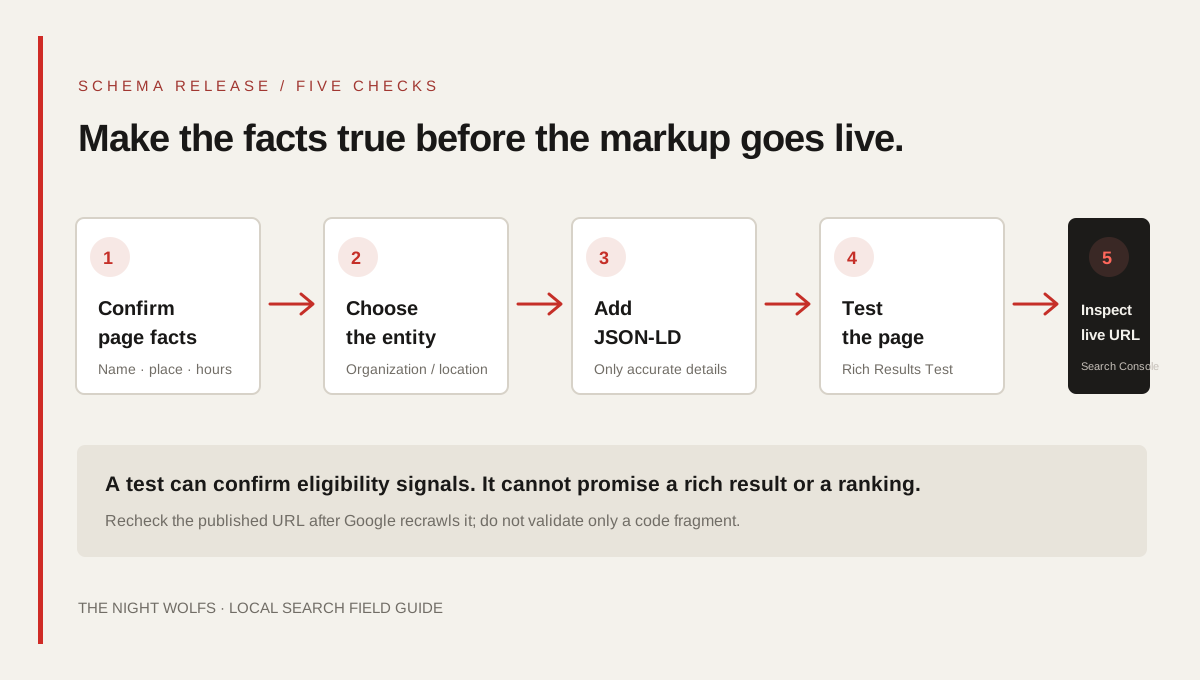
Use Organization markup to describe the business as an entity and LocalBusiness markup for a genuine local location. Google’s LocalBusiness rich-result guide requires a physical PostalAddress; its Organization guide lists no required properties. Keep markup accurate and aligned with information visitors can find on the page. Validate the implementation with Google’s Rich Results Test, then inspect the live URL in Search Console. Correct markup can make a page eligible for supported search features, but it does not guarantee a rich result or ranking.
QUICK REFERENCE
Key takeaways.
- KEY POINT 01Choose Organization for the business as a whole and LocalBusiness for a genuine location the page describes.
- KEY POINT 02Google’s LocalBusiness rich-result guide lists PostalAddress as required; do not invent an address to satisfy it.
- KEY POINT 03Use the most specific type that honestly describes the business, with one clear record for each real location.
- KEY POINT 04JSON-LD is Google’s recommended structured-data format; keep it consistent with visible page details.
- KEY POINT 05Use the Rich Results Test for supported Google features, the Schema Markup Validator for vocabulary, and Search Console for the live URL.
- KEY POINT 06Structured data can support search understanding and eligibility; it cannot promise enhanced display or higher rankings.
STRUCTURED DATA / PURPOSE
Know what structured data can—and cannot—do
Structured data is a standard way to describe page content so software can interpret details such as an organization, address, opening hours or product. It supplements the page; it does not replace useful copy, a crawlable site structure or an accurate Google Business Profile.
Google can use eligible structured data to understand a page and consider it for a supported search appearance. Passing a test is not a ranking guarantee, and Google may choose not to show a rich result even when the markup is valid. Treat schema as an accuracy and eligibility layer, not a shortcut to a top position.
Keep three tasks separate: the website explains the business to people, structured data describes that content in a standard format, and Google Business Profile manages an eligible business presence in Google Maps and local results. Updating one does not automatically update the others.
ENTITY MODEL / ORGANIZATION OR LOCATION
Choose the entity that matches the page
Organization describes a business or institution as a whole. LocalBusiness describes a business at a real physical location. Google’s Organization documentation lists no required properties for its search feature; its LocalBusiness rich-result documentation lists a PostalAddress as required. The right choice depends on what the page actually represents, not on which label sounds more local.
A company homepage may describe the organization. A genuine location page can describe a specific branch. If a business has several real locations, define each location separately and use the most specific type that accurately fits it. Do not turn every service area, neighbourhood or keyword target into a separate LocalBusiness entity.
| Page or entity | Possible type | Use it when |
|---|---|---|
| Business home or about page | Organization | The page describes the company as a whole. |
| A staffed, real business location | A specific LocalBusiness subtype | The page gives accurate information about that location. |
| A service-area business | Organization or a justified location entity | The page and markup can accurately describe the business without exposing or inventing a private storefront. |
| A neighbourhood keyword page | Usually no new entity | It does not describe a separate real organization or physical location. |
LOCAL BUSINESS / REAL-WORLD DETAILS
Map genuine locations before adding markup
For each actual business location, confirm the real-world name, physical address and the page that describes it. Google recommends using the most specific LocalBusiness subtype possible. Its example for a local business includes a PostalAddress with the street, locality, region, postal code and country where those details apply.
Do not mark up a registered office as a walk-in location unless customers are genuinely served there and the page represents it accurately. Do not add virtual offices, mailbox addresses, invented branches or precise coordinates copied from another business. If an address is private or not customer-facing, check the applicable privacy and Business Profile rules rather than publishing it simply to seek a search feature.
Google Business Profile service-area settings and website structured data are separate systems. A service-area description on a profile is not permission to fabricate a storefront in JSON-LD. Keep business names, public contact details and location claims consistent wherever they are shown.
- List the real locations the business operates, not every area it hopes to rank in.
- Match each location entity to a useful page about that same location.
- Use one stable identity per real location; avoid duplicate records with small name variations.
- Leave out private or uncertain details instead of guessing.
JSON-LD / PROPERTY CHECK
Add only useful, supported properties
Google recommends JSON-LD as a structured-data format. It can be added to a page’s HTML without changing how the page is laid out, but the data still needs to be accurate and consistent with the page. Start with a small set of reliable facts, then add applicable properties only when the business can maintain them.
For Google’s LocalBusiness rich-result feature, PostalAddress is required. Google also documents properties such as name, telephone, URL, image, opening hours and geographic coordinates. Check the current feature documentation before relying on a property: a value recognized by Schema.org is not automatically used by every Google feature.
| Property or detail | What to confirm before publishing |
|---|---|
| @type | Use Organization for the business entity or the most specific accurate LocalBusiness subtype for a location. |
| name and url | Use the public business name and a canonical page that actually describes that entity. |
| address | For LocalBusiness eligibility, provide the genuine PostalAddress for the physical business location. |
| telephone and opening hours | Use customer-facing contact information and hours that match the page and actual operation. |
| image and logo | Use current, accessible images the business owns or is permitted to publish. |
| geo | Include coordinates only when verified for that exact location; never estimate them from a nearby landmark. |
| sameAs | Link only official, identity-confirming profiles—not unrelated directories or pages with similar names. |
A useful review question for every property is: “Would a visitor recognize this as the same fact on the page?” If the answer is no, omit it or fix the page first.
QUALITY / MATCH THE VISIBLE PAGE
Keep the markup aligned with what visitors see
Google’s structured-data guidelines require markup to represent the main content of the page and warn against hidden, misleading or irrelevant data. If you add an address, opening hours or service detail to JSON-LD, make sure the information is accurate for the entity and available in the page context.
Avoid copying an example verbatim: example names, addresses, phone numbers, ratings and opening times are placeholders. A copied sample can pass basic syntax checks while describing the wrong business. Never invent a rating, review count, branch or service area to make a search result look more prominent.
Be cautious with review markup. Google’s LocalBusiness documentation says aggregate ratings are intended for sites that capture reviews about other local businesses. Review snippets also have specific eligibility rules, including restrictions on self-serving reviews for an organization or local business on its own site. Genuine testimonials can still be useful to readers without being turned into rating markup.
- Check the business name, URL, address and contact data against the real business.
- Keep schema on the page it describes; do not reuse one branch’s address across multiple locations.
- Do not add hidden keyword text or unverified review data.
- Review ownership and permissions for linked logos, photos and social profiles.
TESTING / THREE DISTINCT CHECKS
Validate syntax, feature eligibility and the live URL
Use the Rich Results Test to check whether Google can read structured data for a supported search feature and to inspect detected errors. Use the Schema Markup Validator to check Schema.org vocabulary more broadly. These tools answer different questions; a clean result in one does not mean that every possible property is useful or that a rich result will appear.
After the page is published, use Search Console’s URL Inspection tool to review the live URL, the canonical Google selected and the last crawl information available. Review any applicable enhancement report if Search Console provides one. Allow time for Google to recrawl the page before interpreting a missing feature as a code failure.
When a test flags an error, fix required fields and invalid values first. Re-test the exact page URL, not only a saved code snippet. If the structured data is injected by a plugin or JavaScript, check the rendered page Google receives and make sure the final output is not duplicated by another plugin.
| Tool | Question it helps answer |
|---|---|
| Rich Results Test | Can Google detect a supported rich-result item and are there critical errors? |
| Schema Markup Validator | Does the markup use Schema.org terms and relationships coherently? |
| Search Console URL Inspection | What does Google report for the published URL and its crawl or canonical status? |
MAINTENANCE / KEEP DETAILS CURRENT
Review the entity whenever the business changes
Schema is not a one-time checkbox. Revisit it when the business changes its public name, address, phone number, hours, website, location structure or official profiles. If a branch closes or moves, update the location page and its markup together and remove any old information that could confuse visitors.
For Mumbai companies, a practical quarterly check can compare each location page with the public contact details the business actually wants customers to use. Keep an inventory of page URL, entity type, location, source of truth and last validation date. That makes it easier to correct changes without creating a second, conflicting business record.
Use structured data as part of a complete local SEO foundation: helpful service and location pages, crawlable internal links, an accurate Business Profile where eligible, and reliable contact details. A schema test can verify markup, but customer usefulness and search visibility depend on much more than a tag.
- Keep one owner for the official business name, address, phone and hours.
- Review markup after a site redesign, CMS switch or change to a page URL.
- Re-test after updates and check Search Console again after Google recrawls.
- Measure real customer actions separately from technical validation status.
PUBLISHING / FINAL REVIEW
Use this checklist before release
A short review catches most avoidable problems before a location page goes live.
- Does the selected type match the real organization or physical location?
- Is every name, address, phone number, hour, image and profile link accurate?
- For LocalBusiness, is the required PostalAddress genuine and appropriate to publish?
- Does the page show the same information the markup describes?
- Have you tested the page URL with Google’s Rich Results Test and a Schema.org validator?
- After release, have you checked the live URL in Search Console without assuming a rich result is guaranteed?
THE DETAILS
Questions worth
asking early.
Clear answers about localbusiness schema in mumbai before you choose your next step.
Does LocalBusiness schema improve Google rankings?
Structured data can help Google understand page content and can make an eligible page a candidate for supported search features. It does not guarantee a rich result or a higher ranking. Helpful content, crawlability and other search systems still matter.
What is required for Google LocalBusiness rich-result eligibility?
Google’s current LocalBusiness structured-data guide lists a physical PostalAddress as a required property. Add accurate details and use the most specific business type that fits the real location. Requirements can change, so check the official guide when implementing.
Should a service-area business add its private address to schema?
Do not publish a private or non-customer-facing address simply to seek a rich result. Describe the business honestly, follow applicable privacy and Google Business Profile rules, and only use LocalBusiness markup when the page and entity meet the documented requirements.
Can I use Organization and LocalBusiness on the same website?
Yes, when each entity is real and clearly described—for example, an Organization for the company and LocalBusiness entities for genuine branches. Keep their identities and relationships clear, and do not duplicate or mislabel the same location.
Which tool should I use to test schema?
Use Google’s Rich Results Test for Google-supported rich-result features, the Schema Markup Validator for broader Schema.org vocabulary, and Search Console URL Inspection to review the published page’s crawl information.
SOURCES & FURTHER READING
- Google Search Central: Local Business structured data (opens in a new tab)
- Google Search Central: Organization structured data (opens in a new tab)
- Google Search Central: General structured data guidelines (opens in a new tab)
- Google Search Central: Review snippet structured data (opens in a new tab)
- Schema.org: LocalBusiness (opens in a new tab)
- Google Rich Results Test (opens in a new tab)