THE SHORT ANSWER
What matters most.
Start by mapping the way a real enquiry moves through the business. Use a short set of clearly defined stages, keep only the record fields the team needs, assign an owner and next step, and test each website, phone and messaging handoff. Review useful pipeline signals, limit access to customer information and improve the setup from real usage rather than adding complexity in advance.
QUICK REFERENCE
Key takeaways.
- KEY POINT 01Map the current enquiry workflow before choosing CRM stages or automations.
- KEY POINT 02Keep a lean set of fields for service fit, source, owner and next action.
- KEY POINT 03Use pipeline stages that describe an observable step rather than a hopeful prediction.
- KEY POINT 04Give every open enquiry a named owner and a practical follow-up task.
- KEY POINT 05Test website forms, calls and WhatsApp handoffs from the customer’s point of view.
- KEY POINT 06Protect records with appropriate access, multi-factor authentication and a clear retention routine.
WORKFLOW / START WITH REALITY
Map the enquiry process before configuring the CRM
Write down what happens from the first enquiry to the final outcome. Include the real entry points—website form, phone call, WhatsApp conversation, referral or walk-in—and the people who receive each request. Note where information is copied, where a response waits and what makes the team decide that an enquiry is suitable.
A local service business, clinic, real estate team and online retailer do not need the same pipeline. A clinic may move from request to appointment and visit; a consultant may move from enquiry to consultation, proposal and signed work. Start from the current customer journey and the work the team actually performs, not from a generic sales template.
Choose one process to pilot first. If several services have genuinely different qualification or approval steps, they may need separate views or pipelines later. Do not create separate pipelines just to make every service look distinct; extra structures are useful only when the team can explain how they change the work.
- Who receives a new request, and how do they know it arrived?
- What information is needed to decide whether the business can help?
- Which actions happen before a meeting, quotation or purchase?
- What outcome closes the record, including “not a fit” or “no response”?
CRM / DATA MODEL
Keep the record fields useful and minimal
Most CRMs organize information into records, fields and relationships. Product names differ, but the practical idea is similar: a person or business has a record, the record holds selected details, and related opportunities or support requests can be connected to it. Before adding a custom field, write down what decision or action it supports and who will keep it current.
A small lead workflow may need a contact name and preferred reply route, requested service, service area, original source, assigned owner, current stage and next action. The exact list depends on what the business can serve. If a field is optional for nearly every request, creates awkward friction or is never used in a decision, remove it from the form or keep it out of the main view.
Separate contact identity from campaign reporting. The CRM may need contact details to answer an enquiry, while analytics reports should use campaign labels and events rather than a person’s name, email or phone number. Google’s Analytics guidance warns against sending personally identifiable information in URLs, campaign dimensions and other Analytics data.
| Field or record detail | Why the team might need it | Keep it useful by |
|---|---|---|
| Requested service | Route the enquiry to the right person | Use a short approved list, not free-form duplicates |
| Service area or location | Check whether the request fits the operating area | Ask only for the detail needed to make that decision |
| Lead source | Understand where the enquiry was first recorded | Use consistent values and preserve self-reported source separately |
| Owner and next action | Make responsibility and follow-up visible | Set a person and a real task, not only a status label |
| Outcome or close reason | Learn which enquiries progressed or did not | Use a small shared set of outcome definitions |
PIPELINE / SHARED LANGUAGE
Define stages the team can apply consistently
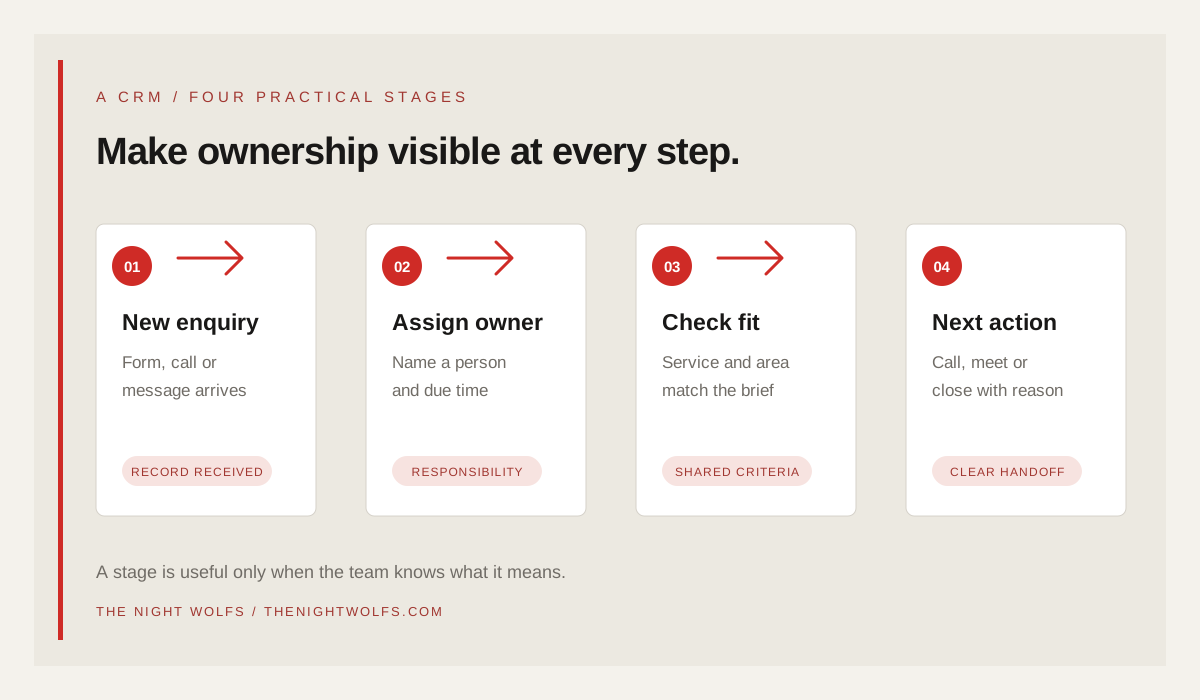
Pipeline stages describe where a record is in a process. Keep the first version short enough that two team members would place the same enquiry in the same stage. A possible starting point is New, Contacted, Qualified, Meeting or Appointment, Proposal or Offer, and Won or Closed. A business can remove steps it does not use or split a stage only when the distinction changes the next action.
Write a one-line entry rule for each stage. “Qualified” might mean the request matches the service, operating area and agreed fit criteria. “Proposal” might mean a priced scope was sent, not merely that someone intends to prepare one. “Won” should reflect a confirmed outcome such as signed work or a completed order, not a positive conversation.
Keep closed-lost or unqualified records visible for learning without leaving them in the active pipeline. Use a concise reason list—such as outside service area, wrong service, timing, no response or chose another option—only if the team can apply it fairly and consistently.
| Stage | Example entry rule | Next question |
|---|---|---|
| New | A request has been received and needs review | Who should own the first response? |
| Contacted | A team member made a real reply attempt | What response or action is waiting? |
| Qualified | The request meets the agreed fit criteria | What is the next useful conversation? |
| Proposal or appointment | The agreed next step has been sent or booked | When will the team check back? |
| Won or closed | A confirmed business outcome or close reason exists | What should be learned or handed over? |
ENQUIRY / INTAKE ROUTING
Connect forms, calls and messages without losing ownership
A CRM only helps if new requests reach a person who can act. Test each live route from a visitor’s perspective: submit the form on a phone, call the displayed number and open the WhatsApp link. Confirm the right team receives the request, the source is preserved where available and the visitor sees an accurate confirmation.
Treat an event as the thing it confirms. A form success means the submission was accepted; a click-to-call event means the number was selected; a WhatsApp click means the chat link opened. None of these alone proves that a useful conversation happened. When staff confirm an actual call, appointment or qualified discussion, update the record at that stage.
Decide how the system handles duplicate contacts and repeat requests. A person can ask about two services or return with a new need, so avoid both extremes: one permanent record for every situation, or a new contact record for every click. Agree which identity fields are used for matching, when a separate opportunity is created and who can merge records safely.
- Name a default owner or shared queue for every new intake route.
- Set a fallback owner for holidays, leave or a failed integration.
- Send a short acknowledgement only after the enquiry has actually been received.
- Test duplicate submissions and repeat customer requests before launch.
FOLLOW-UP / RESPONSIBILITY
Assign an owner, a due date and a real next action
A stage label does not contact a customer. Each open record needs a person responsible for the next move, a practical task and a due time agreed by the business. The next action might be to call back, clarify the requested service, prepare a quotation or confirm an appointment. If the team cannot identify the next action, the record is not operationally ready.
Set response expectations based on staffing, opening hours and the type of request. A business that cannot reliably respond outside its working hours should say when a visitor can expect a reply instead of implying that a person is always available. Automations should acknowledge receipt or create a task only when the trigger and fallback behavior are tested.
Review overdue tasks with the team. If many enquiries repeatedly miss the same step, adjust ownership, routing or workload rather than adding another reminder that nobody can maintain.
REPORTING / DECISION SUPPORT
Build a simple view of pipeline health
Start with a small view that answers the team’s recurring questions: how many new requests need attention, which records have no owner, where work is waiting, how many enquiries meet the qualification rule and which confirmed outcomes have closed. These counts are useful only when stages are defined and updated as work happens.
Compare source and outcome carefully. A CRM report can show which enquiries the team marked as suitable, but the answer depends on accurate source capture and consistent follow-up. Use the methods in a separate lead-tracking guide to keep campaign naming consistent, and avoid adding ad-platform conversions to CRM totals as if both systems measured the same thing.
For an early setup, a saved pipeline view or a short weekly review may be more useful than a complex dashboard. Add a report when someone can name the decision it will help them make and the person responsible for keeping the underlying data correct.
| Review question | A useful signal | Action if it looks wrong |
|---|---|---|
| Are new requests waiting? | Unassigned records or overdue first tasks | Check intake routing and ownership |
| Are suitable requests progressing? | Qualified records without a next task | Review follow-up steps and capacity |
| Where do opportunities stop? | Stage age or repeated close reasons | Check the offer, timing and process friction |
| Which sources bring fitting requests? | Consistent source plus qualified outcome | Validate tracking before changing spend |
DATA / ACCESS & CARE
Protect customer records and keep the setup maintained
CRM records can contain contact details, enquiry history and commercial information. Give access according to each person’s role, remove access when responsibilities change and enable multi-factor authentication on accounts that support it. The U.S. FTC’s small-business guidance recommends taking stock of personal information, keeping only what is needed, protecting retained data and planning how to dispose of it; NIST also explains why MFA adds protection beyond a password. These are practical security references, not a substitute for advice about Indian legal requirements.
Agree who can export records, connect third-party apps, change automations and manage access. Review integrations before sending data to another platform. Do not store passwords, payment card details or sensitive information in general notes when the CRM is not designed and approved for that purpose.
Set a routine to review stale records, test automations and document field definitions. Follow the applicable privacy notice, retention rules and customer requests for the business; where a legal question is uncertain, seek qualified local advice rather than relying on a CRM template.
- Use named accounts instead of shared logins where possible.
- Enable multi-factor authentication and review administrator access.
- Limit exports and integrations to people and systems that need them.
- Remove data the business no longer needs using the provider’s supported process.
IMPLEMENTATION / VERIFY THE HANDOFF
Pilot the CRM with real enquiries before expanding
Use a manageable group of incoming requests to check whether the fields, stages and ownership rules fit the real work. Ask the people using the CRM to complete the whole path: intake, response, qualification, next task and close. Note where they need a field that is missing, where a field is confusing and where the same information is entered twice.
Fix those friction points before automating more. Keep a short guide for the team that explains what each stage means, which fields are required and how to handle duplicates or records that are not a fit. Revisit the process after the team has used it for a representative operating period.
A well-set-up CRM is not the one with the most automation. It is the one the team can maintain, that keeps customer information appropriately protected and that makes the next useful action easier to see.
- A test enquiry appears in the right queue with the expected source.
- The owner can update its stage and create a next action.
- A duplicate or unsuitable request can be handled consistently.
- The team can identify a confirmed outcome and close the record.
THE DETAILS
Questions worth
asking early.
Clear answers about crm setup for small businesses in mumbai before you choose your next step.
Does a small business need a CRM or is a spreadsheet enough?
A spreadsheet may be enough when one person can keep it accurate, access is controlled and follow-ups are not being missed. A CRM becomes more useful when several people share enquiries, stages or tasks and need a reliable record of ownership and history.
What CRM pipeline stages should I start with?
Start with the fewest stages that describe real, observable steps, such as New, Contacted, Qualified, Appointment or Proposal, and Won or Closed. Write an entry rule and next action for each stage, then adjust after the team uses it.
Should every employee see every customer record?
Not automatically. Give people access that fits their responsibilities, review exports and integrations, and remove access when roles change. The exact controls depend on the CRM and the information the business stores.
How many fields should I add to a lead form?
Ask for the minimum information needed to understand and respond to the request. Add a field only when it supports a clear next step or qualification decision, and keep contact details out of analytics URLs and campaign parameters.
SOURCES & FURTHER READING
- HubSpot Knowledge Base: Manage your CRM database (opens in a new tab)
- HubSpot Knowledge Base: Set up and manage object pipelines (opens in a new tab)
- HubSpot Knowledge Base: Create and edit properties (opens in a new tab)
- Federal Trade Commission: Protecting Personal Information, A Guide for Business (opens in a new tab)
- NIST Small Business Cybersecurity: Multi-Factor Authentication (opens in a new tab)