THE SHORT ANSWER
What matters most.
Choose the questions the chatbot is allowed to answer, prepare accurate business information and design a short conversation that works on mobile and with a keyboard. Collect only details needed for the enquiry, limit system access, test misleading and out-of-scope questions, and explain exactly what happens when a person needs to take over. Measure helpful resolutions and safe handoffs, not chat volume alone.
QUICK REFERENCE
Key takeaways.
- KEY POINT 01Define a small set of supported questions and a clear boundary for everything else.
- KEY POINT 02Use approved, current service information and make uncertainty visible instead of inventing an answer.
- KEY POINT 03Tell visitors when they are speaking with AI and what a human handoff can actually provide.
- KEY POINT 04Collect only the details needed to answer or route the enquiry, with a clear privacy explanation.
- KEY POINT 05Keep tools and permissions narrow; do not let a chatbot make consequential changes on its own.
- KEY POINT 06Test keyboard, mobile, language, prompt-injection and escalation scenarios before launch.
PURPOSE / START WITH A REAL VISITOR NEED
Choose one useful job for the chatbot
Start with the questions customers already ask: which services are available, what area the business serves, how to request a consultation, what information to include or how to reach the team. Pick a small set of tasks that can be answered with information the business has reviewed and can keep up to date.
Separate information from decisions. A bot may explain a published service or collect a visitor’s preferred contact route; it should not invent a price, promise a delivery date, approve a refund or decide whether a complex request qualifies unless the business has a tested and authorized process for that action.
Write down what the assistant will not do. A narrow boundary helps the team explain the experience, test it and identify the point where a person should take over. If the current process is unclear, document the process before asking a chatbot to handle it.
| Visitor need | Possible chatbot role | Boundary to state |
|---|---|---|
| Understand a service | Summarize approved service details and link to the relevant page | Do not claim availability or results beyond published information |
| Request a consultation | Collect the minimum details needed to route the enquiry | Do not imply that an appointment is confirmed until the team confirms it |
| Ask about a custom project | Ask one clarifying question and prepare a handoff | Do not generate a binding quote or promise a scope |
| Raise a complaint or sensitive issue | Acknowledge the request and provide a human contact route | Do not attempt to settle a sensitive matter automatically |
KNOWLEDGE / CURRENT SOURCE MATERIAL
Prepare approved information and a reliable fallback
Build the chatbot’s knowledge from information the business has approved: service descriptions, real operating areas, contact routes, hours, enquiry steps and policy pages. Assign an owner to each source and review dates when those details change. Old campaign copy, draft documents and conflicting versions can lead to answers that sound confident but are no longer correct.
For each supported question, decide what counts as a complete answer and which page or team member is the source of truth. If the chatbot cannot find a supported answer, it should say so and offer a useful next step. Do not let a language model fill missing facts with plausible-sounding prices, timelines, guarantees or service details.
Treat information retrieved from user messages, uploaded files or webpages as content to assess, not as permission to change the chatbot’s operating rules. OWASP’s 2025 guidance identifies prompt injection as a risk for language-model applications; retrieval and careful prompts can help, but do not remove the need for access controls, testing and safe fallbacks.
- List the exact pages or documents the assistant is allowed to use.
- Remove old prices, expired offers and draft internal notes from the approved set.
- Show a human contact route when an answer is missing or conflicting.
- Set a review owner and a process for updating the content after changes.
EXPERIENCE / VISITOR CONTROL
Make the conversation short, accessible and honest
The first message should identify the assistant as automated and explain what it can help with. Let visitors ask a question in their own words, then ask one optional follow-up at a time. Avoid a long forced questionnaire before the visitor understands why the details are needed.
Keep the chat usable on a small screen: readable text, visible focus, buttons with clear names, a keyboard path to open and close the panel, and an alternative way to contact the business. Follow accessibility guidance such as WCAG 2.2 for interaction and input design, and test with a keyboard and assistive technology rather than relying on visual review alone.
Offer a clear way to dismiss or restart the chat. If the bot provides quick-reply buttons, keep a text alternative. Visitors should not lose their place on the page or be trapped in an overlay because the chat is prominent.
- Say plainly that the visitor is interacting with an AI assistant.
- Keep “close”, “start over” and “contact the team” easy to find.
- Use readable labels and keyboard-accessible controls.
- Do not make color, animation or voice the only way to understand a response.
PRIVACY / DATA MINIMIZATION
Ask only for details needed to help
Before asking for a name, phone number, email address or project details, decide how the business will use each field and who can access it. A service question may need a service category and preferred reply route; it may not need a full address, personal documents or sensitive history. Make optional information visibly optional.
Explain what happens after submission: whether the details go to an enquiry team, whether someone will reply later and how the visitor can contact the business directly. Link to the appropriate privacy information and align chatbot handling with the business’s own retention and access practices. This guide is not a substitute for legal advice about applicable privacy requirements.
Keep customer identity out of analytics URLs and chat telemetry where it is not needed. Separate operational enquiry records from aggregate measurements such as chatbot opens, topic choices, completed handoffs and unresolved questions.
| Data point | Ask when | Avoid |
|---|---|---|
| Requested service | It helps route the request to the right team | Collecting unrelated personal details before giving basic information |
| Preferred reply route | A human response is requested | Making a phone number mandatory when another route works |
| Project context | A short description is needed to understand the request | Requesting confidential files or sensitive information in an open chat |
| Conversation analytics | The measurement is necessary and appropriately configured | Putting names, email addresses or phone numbers in event labels or URLs |
ESCALATION / NO FALSE LIVE-CHAT PROMISES
Make the human handoff work after hours too
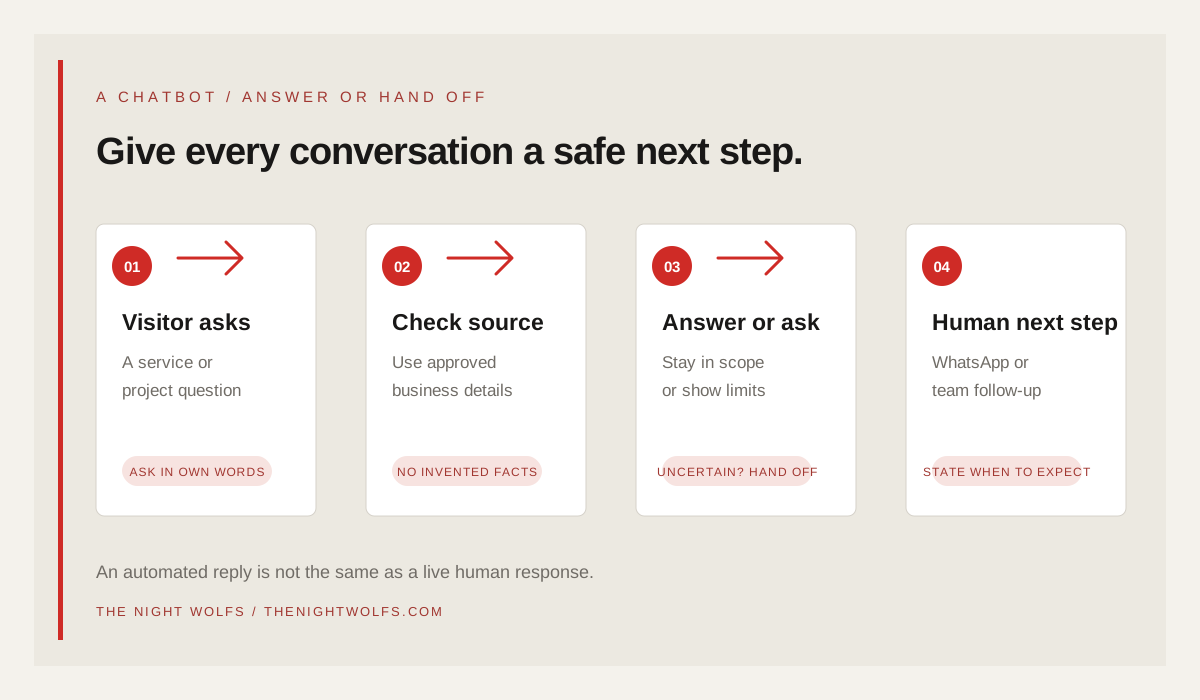
A chatbot can answer at any hour only if its service and supporting systems are operating; that does not mean a human is available at all hours. Distinguish an automated reply from a live agent. If the team responds during set hours, show those hours and tell visitors when to expect a reply instead of promising immediate assistance.
When a visitor asks for a person, the answer is uncertain or the topic is sensitive, offer a direct handoff. If WhatsApp is the selected route, say that the visitor will open WhatsApp and may need to send the message. Do not claim the conversation has transferred successfully until the connected system confirms it. Provide a phone or email alternative when the link fails or the visitor does not use WhatsApp.
Pass only the context needed to avoid making the visitor repeat the request, and tell them what will be shared. Define who receives the handoff, how it is queued and what happens if no one is available. A dependable “we received your request; our team will follow up during these hours” message is more useful than implying a person is already on the chat.
SECURITY / LEAST PRIVILEGE
Keep the chatbot’s tools and permissions narrow
A website chatbot that only answers questions needs different access from a system that can update a CRM, send messages or book appointments. Give it only the capabilities required for its approved job. OWASP describes excessive agency as risk from too much functionality, permission or autonomy; a language model should not receive broad account access simply because an integration makes it possible.
Keep sensitive actions in application code with validation and authorization. For actions that affect a person or business record, require the correct checks and a confirmation path rather than letting generated text trigger an unrestricted change. Protect credentials outside the model prompt, restrict access to private records and log actions in a way the team can review.
Use prompt instructions as one safety layer, not the whole security design. OWASP notes that prompt injection can influence model behavior, including through external content, and does not have a foolproof prompt-only fix. Combine narrow tool permissions, input and output checks, human approval for consequential actions and ongoing tests.
- Do not expose account credentials or private system instructions in chat context.
- Separate read-only lookup from record updates or outbound messages.
- Validate every tool request in the application before taking action.
- Require human approval for sensitive or consequential decisions.
QUALITY / TEST THE FAILURE PATH
Test normal, difficult and out-of-scope conversations
Create a test set from questions the team actually receives. Include short and unclear requests, missing details, contradictory business information, requests for unlisted services and questions where the correct response is “I do not know.” Review whether answers match approved sources and whether the bot offers a useful next step.
Test deliberately misleading instructions and attempts to make the chatbot reveal internal information or take an unapproved action. Include the channels a customer can use after escalation, keyboard operation, mobile layouts and the languages the business plans to support. Only advertise a language or service capability after fluent reviewers have checked real conversations in that language.
Track failures by type: wrong fact, missing handoff, unnecessary data request, inaccessible control, broken external link or integration failure. Fix the underlying source, prompt, permissions or interface and rerun the test. NIST’s Generative AI Profile recommends managing risk across the lifecycle, which is a better model than treating a launch-day checklist as final assurance.
- Test a typical question, an ambiguous question and a question outside scope.
- Test a prompt-injection attempt and confirm it cannot access private data or tools.
- Test the handoff when a person is available and when one is not.
- Test keyboard use, phone layout and any supported language variants.
- Record the issue, fix and retest result before expanding the bot’s scope.
MEASUREMENT / LEARN AND IMPROVE
Measure useful resolutions, not just chat volume
A high number of chat opens does not show that the visitor received a useful answer. Define measures that fit the bot’s job: supported-question resolution, successful human handoff, qualified enquiries, repeated unresolved questions, corrections, abandonment and integration errors. Keep “answer delivered” distinct from “customer need resolved” unless the latter is actually confirmed.
Review a sample of conversations with appropriate access and privacy controls. Ask staff whether the handoff contained enough context, whether the enquiry was routed correctly and whether the bot made a promise the team could not keep. Use this review to update approved content and remove unsupported behavior.
Launch with a narrow scope, a named owner and a schedule for checking changes to services, hours, policies and connected tools. Expand only when the team can show that the current experience is helpful, accessible and recoverable when the bot is uncertain.
| Signal | What it can tell you | What it cannot prove alone |
|---|---|---|
| Supported answer with source | The assistant returned information from an approved source | That the visitor understood or completed the task |
| Human handoff accepted | The visitor selected a route to a person | That a person has already replied |
| Qualified enquiry | The team applied its agreed fit criteria | That a sale or booking will follow |
| Unresolved or corrected answer | A knowledge or workflow gap needs review | Which fix will work without retesting |
THE DETAILS
Questions worth
asking early.
Clear answers about ai chatbots for mumbai businesses before you choose your next step.
Can an AI chatbot replace a live support team?
It can answer a limited set of routine questions and collect details for a handoff, but it should not be represented as a live person. Keep a clear path to a human for uncertain, sensitive or out-of-scope requests.
Can a chatbot provide 24/7 customer service?
An automated assistant may be available outside business hours if the system is operating, but that does not guarantee a live human response or resolve every request. State when the team will follow up and provide a fallback contact route.
How can I reduce incorrect chatbot answers?
Use current, approved business information, limit the bot to a clear scope, make uncertainty visible, test common and adversarial inputs, and route unsupported questions to a person. No single prompt or knowledge source guarantees that every answer will be correct.
What information should the chatbot collect?
Collect only what is needed to answer or route the visitor’s request. Explain why a field is needed, make optional details optional, protect the enquiry record and avoid putting personal contact details into analytics URLs or event labels.
SOURCES & FURTHER READING
- NIST AI 600-1: Generative Artificial Intelligence Risk Management Profile (opens in a new tab)
- OWASP GenAI Security Project: 2025 Top 10 for LLMs and Generative AI Apps (opens in a new tab)
- OWASP: LLM01 Prompt Injection (opens in a new tab)
- OWASP: LLM06 Excessive Agency (opens in a new tab)
- W3C: Web Content Accessibility Guidelines (WCAG) 2.2 (opens in a new tab)