THE SHORT ANSWER
What matters most.
Set up SPF, DKIM and DMARC using the exact records from the email provider, and verify alignment with the visible From domain. Send only to people who expect the message, make unsubscribing straightforward, and monitor bounces, complaints and provider diagnostics. Google and Yahoo publish sender requirements for specific audiences and volumes; those rules can change, and meeting them does not guarantee inbox placement.
QUICK REFERENCE
Key takeaways.
- KEY POINT 01Separate successful sending from inbox placement; one does not prove the other.
- KEY POINT 02Use the sending provider’s exact SPF and DKIM instructions, then configure DMARC and check alignment.
- KEY POINT 03Do not replace existing DNS records or publish a second SPF record without reviewing every service that sends mail.
- KEY POINT 04Keep marketing recipients permission-based and distinct from people who only requested an enquiry reply.
- KEY POINT 05Provide a visible unsubscribe link and the required one-click option for qualifying bulk marketing sends.
- KEY POINT 06Use Google Postmaster Tools and your email platform’s reports as diagnostics, not as a promise of future delivery.
DELIVERY / WHAT TO MEASURE
Separate delivery from inbox placement
Email platforms use “delivered” to describe a message accepted by a receiving mail server. That status does not tell you whether the message went to the primary inbox, a promotions tab, spam or another folder. A sender dashboard is useful, but it cannot see every recipient’s mailbox view.
Start by defining the problem. A rejection or temporary deferral is different from a message accepted but not seen. Compare provider responses, bounce categories, spam complaints and customer reports before changing DNS, subject lines or sending volume. If only one recipient says an email is missing, check that mailbox and message trace before assuming the whole domain has a delivery issue.
| Signal | What it may tell you | A useful first check |
|---|---|---|
| Hard bounce or rejection | A message could not be accepted as addressed or was refused. | Review the exact SMTP response, address status and sender setup. |
| Temporary deferral | The receiver postponed acceptance or applied a sending limit. | Check provider logs, sending pattern and retry behavior. |
| Accepted but not found | The receiving server accepted it, but placement is unknown. | Check spam, tabs, mailbox rules and the recipient’s report. |
| Spam complaint | A recipient or provider marked a message as unwanted. | Review permission, audience choice, expectation and frequency. |
DOMAIN AUTHENTICATION / THREE RECORDS
Authenticate the domain that sends your email
SPF, DKIM and DMARC solve related but different problems. SPF identifies sending infrastructure authorized for a domain. DKIM lets a receiving server check a cryptographic signature associated with the sending domain. DMARC uses the visible From domain to check whether SPF or DKIM aligns, and publishes a policy for handling messages that fail.
Google’s current guidance for messages to personal Gmail accounts lists SPF or DKIM authentication for all senders. Senders that deliver more than 5,000 messages per day to Gmail accounts have additional requirements, including SPF, DKIM, DMARC, From-domain alignment and one-click unsubscribe for marketing or subscribed messages. Yahoo has its own requirements for bulk senders. Check both providers’ current guidance and your email platform’s setup instructions before making changes.
| Method | What it checks | What to verify |
|---|---|---|
| SPF | Whether the sending source is authorized by the relevant domain. | The provider’s exact TXT record and all services that send from the domain. |
| DKIM | Whether a message carries a valid signature for a configured domain key. | The provider’s selector and public key are published correctly in DNS. |
| DMARC | Whether SPF or DKIM passes in alignment with the visible From domain, and what policy is published. | The policy, alignment and report destination are intentional and monitored. |
Authentication helps establish who is sending a message; it does not establish that a recipient asked for it or that a mailbox will place it in the inbox.
DNS / CHANGE CONTROL
Publish DNS records without disrupting existing mail
Before editing DNS, list every system that sends email for the business: the mailbox provider, website forms, invoicing or booking software, CRM, and any newsletter platform. A new record that authorizes only one sender can cause other legitimate messages to fail authentication. Ask each provider for the exact host name and value for the sending domain you use.
Do not paste a second SPF policy beside an existing one. Review the current record and follow the provider’s documented method for including another authorized service. Avoid replacing MX, verification or other TXT records while adding email authentication. If you are unsure which system owns a record, save its current value and ask the domain or email administrator before changing it.
After publishing, allow for DNS propagation and verify from the provider’s dashboard or a test message header. Test both campaign mail and ordinary operational messages—such as enquiry acknowledgements—before resuming a larger send. Keep a change note with the record, owner, date and reason so it can be reviewed later.
- Inventory every legitimate sender before editing DNS.
- Copy values from the email provider, not from a generic example.
- Preserve existing MX and TXT records unless the responsible provider instructs otherwise.
- Verify authentication and From-domain alignment on a real test message.
- Test campaign and operational email separately after the change.
AUDIENCE / EXPECTATION
Send to people who expect the message
Technical authentication cannot repair a list that recipients do not recognize. Use sign-up language that identifies the business and explains the type of email people will receive. Keep a record of where and when a person subscribed, and make the marketing choice separate from a form needed only to reply to an enquiry.
Do not buy, scrape or borrow lists, and do not treat a quote request as automatic permission for an ongoing newsletter. Remove invalid addresses through the email platform’s suppression process instead of repeatedly retrying them. If a list is old or its origin is unclear, pause before sending and establish whether the intended recipients still expect the messages.
Match each campaign to the audience’s stated interest and expected frequency. A person who subscribed for occasional service updates may not expect daily promotions. When the business changes the type or pace of messages, explain the change and give subscribers a meaningful preference or unsubscribe option.
- Use a clear, unchecked opt-in for marketing updates.
- Keep enquiry replies and ongoing marketing permission distinct.
- Keep the subscription source and date where practical.
- Suppress unsubscribed, invalid and repeatedly bouncing addresses.
- Avoid sudden large sends to an old or unverified list.
SUBSCRIBER CONTROL / OPT-OUT
Make unsubscribing easy—and process it promptly
A visible unsubscribe link in the email body helps a reader act without searching for account settings or contacting support. For qualifying bulk marketing mail, Google and Yahoo also require a one-click unsubscribe mechanism in the message headers. RFC 8058 describes the List-Unsubscribe-Post method used for this purpose; a footer link alone is not the same header-based one-click mechanism.
Yahoo’s bulk-sender guidance says to honor unsubscribe requests within two days. Treat opt-outs as a priority, and make sure a suppressed address is excluded from future campaigns even if the contact appears in another imported segment. Do not require a login or a long survey to finish an unsubscribe.
Test the actual path from a delivered message: the body link, the mail client’s unsubscribe control, and the platform’s suppression list. Keep the confirmation short and clear. A working opt-out protects the reader’s choice and can reduce the chance that an unwanted message is reported as spam.
- Include a clear unsubscribe link in each marketing email.
- Confirm the platform supports the required one-click list-unsubscribe headers for applicable sends.
- Test that an opt-out immediately updates suppression and audience selection.
- Keep a record of the request without re-adding the address through later imports.
SENDING PLAN / MESSAGE TYPES
Keep campaign mail distinct from essential messages
A newsletter and a password reset serve different purposes and create different expectations. Where the email provider supports it, separate marketing campaigns from transactional or account messages using clearly managed sending streams or subdomains. Yahoo recommends separating bulk or marketing traffic from user mail and transactional alerts when a sender controls that infrastructure.
Separation is not a shortcut: each sending identity still needs correct authentication, monitoring and a clear owner. Do not create extra domains or IPs without a plan to maintain them, and do not move a campaign to a fresh domain to escape complaints. If a business uses a hosted email platform, follow its supported configuration rather than trying to manage infrastructure it does not control.
Keep the visible From name recognizable and use a domain the business controls. Make sure replies go to an address someone monitors. Avoid using a free-mail address in a way that impersonates another domain or conflicts with the provider’s authentication requirements.
DIAGNOSTICS / READ THE RIGHT SIGNAL
Use provider reports to find the next check
Google Postmaster Tools can show data for outgoing mail to personal Gmail accounts, including authentication, spam rate, domain and IP reputation, encryption and delivery errors. It is not a live inbox-placement report for every provider. Google notes that dashboard data is not real time, often updates within about a day, and may be absent when sending volume is low.
Review the sending platform’s bounce and complaint reports alongside provider diagnostics. Google and Yahoo publish a 0.3% spam-rate ceiling in relevant sender guidance; treat it as a threshold to stay well below, not as an acceptable target. The providers calculate and display these signals in their own systems, so do not assume that figures from different dashboards are directly comparable.
Change one likely cause at a time and keep a record of the audience, volume, sending domain and message version. If authentication passes but complaints rise, review how the list was collected and whether the message matches the promise at sign-up. If a provider reports a DNS or authentication error, fix that configuration before rewriting creative. Do not use open rate alone to diagnose delivery.
| Pattern | Starting point for investigation |
|---|---|
| SPF, DKIM or DMARC failure | Check DNS values, authorized senders, selectors and visible From alignment. |
| Hard bounces increasing | Review address source and data entry; suppress invalid addresses. |
| Spam complaints increasing | Check opt-in source, message expectation, audience selection and frequency. |
| Accepted mail but few useful visits | Review the message promise, link destination and relevance—not just authentication. |
| No Postmaster data | Check domain verification, volume and dashboard scope before assuming a tracking failure. |
RELEASE CHECK / BEFORE A CAMPAIGN
Use this practical email delivery checklist
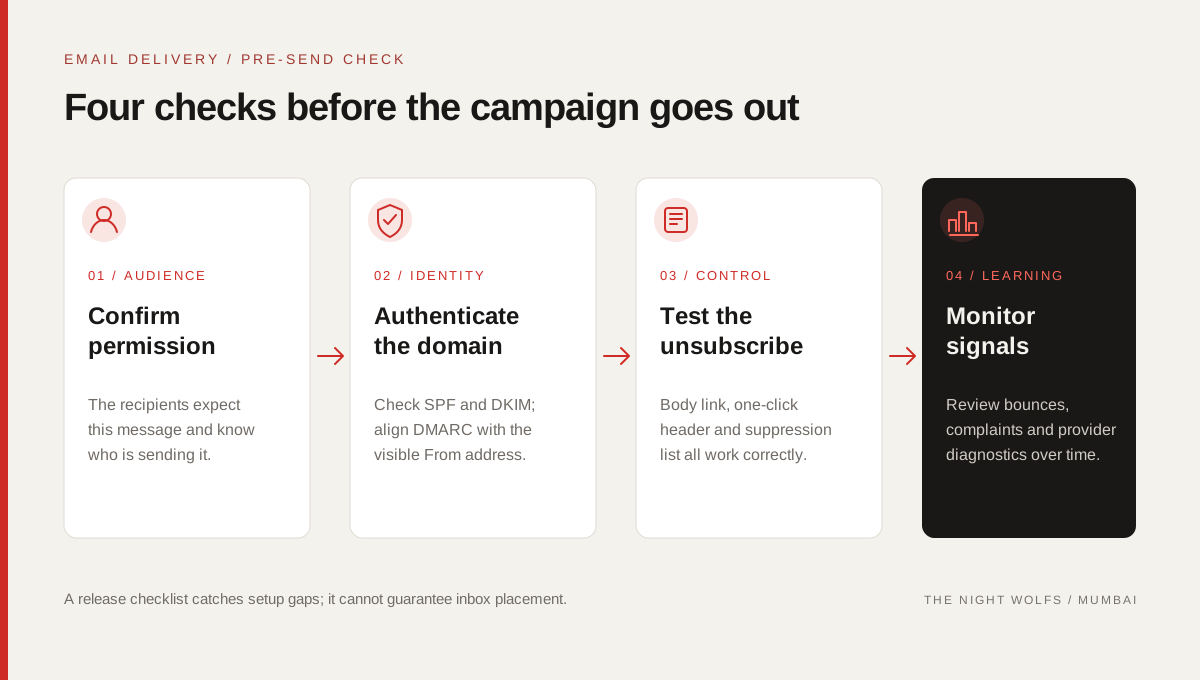
A small pre-send check is easier than diagnosing an avoidable problem after a campaign goes out. Assign an owner to verify each item and keep the result with the campaign record.
- The audience expects this type of email and the subscription source is understood.
- SPF, DKIM and DMARC are set up for the actual sending domain and aligned as required.
- Existing website, transactional and mailbox senders were not broken by a DNS change.
- The visible From name and reply address are accurate and monitored.
- The body unsubscribe link and any required one-click header work as intended.
- Invalid addresses are suppressed and the send volume is appropriate for the list.
- A person knows where to review bounces, complaints and provider diagnostics.
- The business has not treated authentication or a dashboard status as an inbox guarantee.
THE DETAILS
Questions worth
asking early.
Clear answers about email deliverability in mumbai before you choose your next step.
Does SPF, DKIM and DMARC guarantee inbox placement?
No. Authentication helps receivers verify the sending domain and message, but mailbox placement also depends on recipient expectations, complaints, content, reputation and provider decisions.
Does a small business need all three email authentication methods?
Follow the requirements of the providers you send to and the email platform you use. Google and Yahoo have baseline authentication requirements, with additional requirements for qualifying bulk senders. Setting up SPF, DKIM and DMARC carefully is a sound domain-protection practice, but the exact DNS values must come from your provider.
What does a DMARC p=none policy do?
A p=none policy asks receiving systems not to quarantine or reject messages solely because DMARC fails, while allowing reports to be collected when configured. It is useful for monitoring, but it does not fix SPF or DKIM failures or guarantee delivery.
Can I use the same email stream for newsletters and transactional messages?
Some providers support separate sending streams or subdomains for marketing and operational mail. Follow the provider’s design and make sure each stream is authenticated and monitored; do not create extra sending identities without an owner and maintenance plan.
Why is there no data in Google Postmaster Tools?
The dashboards cover mail sent to personal Gmail accounts, are not real time and may omit days with low volume. Confirm the domain is verified and allow time for data to appear before treating an empty dashboard as an error.
SOURCES & FURTHER READING
- Google Gmail Help: Email sender guidelines (opens in a new tab)
- Google Workspace Admin Help: Email sender guidelines FAQ (opens in a new tab)
- Yahoo Sender Hub: Sender best practices (opens in a new tab)
- Google Gmail Help: Postmaster Tools dashboards (opens in a new tab)
- IETF RFC 8058: Signaling One-Click Functionality for List Email Headers (opens in a new tab)
- IETF RFC 7489: Domain-based Message Authentication, Reporting, and Conformance (opens in a new tab)