THE SHORT ANSWER
What matters most.
Build an education marketing plan around one real programme and the people evaluating it. Make eligibility, curriculum, location or online format, fees and admission steps easy to find. Use search for active demand, social and video to explain the experience, and permission-based follow-up to help families compare. ASCI’s education-advertising guidance calls for substantiation of claims about recognition, rankings, results, placements and guarantees. Google Ads lead forms require a privacy-policy link and are subject to account and vertical eligibility. Measure qualified enquiries and completed applications—not just low-cost form fills. No channel or checklist guarantees admissions or search ranking.
QUICK REFERENCE
Key takeaways.
- KEY POINT 01Describe one programme clearly for the students and families it is designed to serve.
- KEY POINT 02Connect discovery, comparison, enquiry, counselling and application into one usable journey.
- KEY POINT 03Show current, substantiated details for recognition, rankings, results, placements, fees and facilities.
- KEY POINT 04Match each campaign to a programme page that answers the questions behind the click.
- KEY POINT 05Collect only the details the admissions team needs, publish privacy information and route enquiries securely.
- KEY POINT 06Measure qualified enquiries, visits, applications and enrolments instead of optimizing only for form volume.
STRATEGY / START WITH THE PROGRAMME
Define the programme and the people choosing it
Begin with one course, school, campus or admissions cycle rather than promoting an institution as if every visitor had the same needs. Write down the programme name, age or qualification level, subject, format, location, eligibility, fees and next admissions date. If the offer changes by campus, batch or learning mode, make those differences explicit.
Map the decision-makers as well as the learner. A prospective student may need to understand the curriculum and daily experience; a parent may want eligibility, safety, fees, timings or the application process. Adults considering a professional course may focus on schedule, prerequisites and the work involved. Do not assume that every audience uses the same language or needs the same proof.
Use real conversations with admissions staff to find recurring questions. Search suggestions and competitor pages can reveal how a topic is described, but they do not prove demand or give permission to copy another institution’s claims. Choose a message the institution can support with current information.
- Pick one programme and one admissions objective for the campaign.
- List the questions students and families ask before applying.
- Confirm which details change by location, batch, course or learning format.
- Ask the admissions team to verify the information before publication.
STUDENT EXPERIENCE / MAKE THE NEXT STEP OBVIOUS
Map the admissions journey from first visit to application
A campaign works best when its parts agree. A search ad, social video, programme page, enquiry form and admissions response should describe the same course and the same next step. If an ad promotes an open house, the landing page should show its date, location, registration process and what visitors can expect.
Think through the journey from the visitor’s point of view: discover a programme, compare its details, ask a question and decide whether to apply. A prospective learner who is still comparing may need a course outline or campus visit. Someone ready to apply needs clear eligibility, required documents and an accurate application link.
Remove dead ends. Check mobile navigation, form confirmation, map links, call buttons and application destinations. If admissions dates or batches change, assign someone to update the campaign and page together so visitors do not arrive at an expired offer.
Use the stages below as an experience check—not as a promise that every visitor will move through the same sequence.
CHANNEL PLANNING / GIVE EACH ONE A JOB
Choose channels according to what the learner needs
Different channels help with different questions. Search can reach people already looking for a course or admissions detail. Social and video can introduce a programme, demonstrate a real learning environment or explain how an open day works. Email and WhatsApp can support a follow-up conversation when the person has asked to hear from the institution.
For local discovery, keep eligible Google Business Profile details accurate: institution name, address, category, hours, phone and website should reflect the real operation. A profile is not a substitute for a detailed course page, and it should not be used to imply a separate campus where one does not exist.
Do not decide that one platform is best for every school or course based on a generic benchmark. Compare channels using the same programme, audience, enquiry definition and follow-up process. A high number of submissions can still be unhelpful if the people do not meet eligibility or the admissions team cannot respond.
| Channel | Useful role | What to keep aligned |
|---|---|---|
| Search ads and SEO | Answer active course, location and admissions searches. | The exact programme, eligibility and current application details. |
| Google Business Profile | Help people find and contact a real eligible campus. | Accurate location, hours, contact details and website. |
| Social and video | Explain the learning experience, programme or event. | Real people, current facilities and a truthful creative message. |
| Open days and events | Let prospective learners ask questions in person. | Date, location, registration and what visitors can expect. |
| Email or WhatsApp | Continue a requested conversation or share useful updates. | Permission, relevance, clear identity and a simple way to stop messages. |
LANDING PAGE / ANSWER BEFORE ASKING
Build a programme page that helps families compare
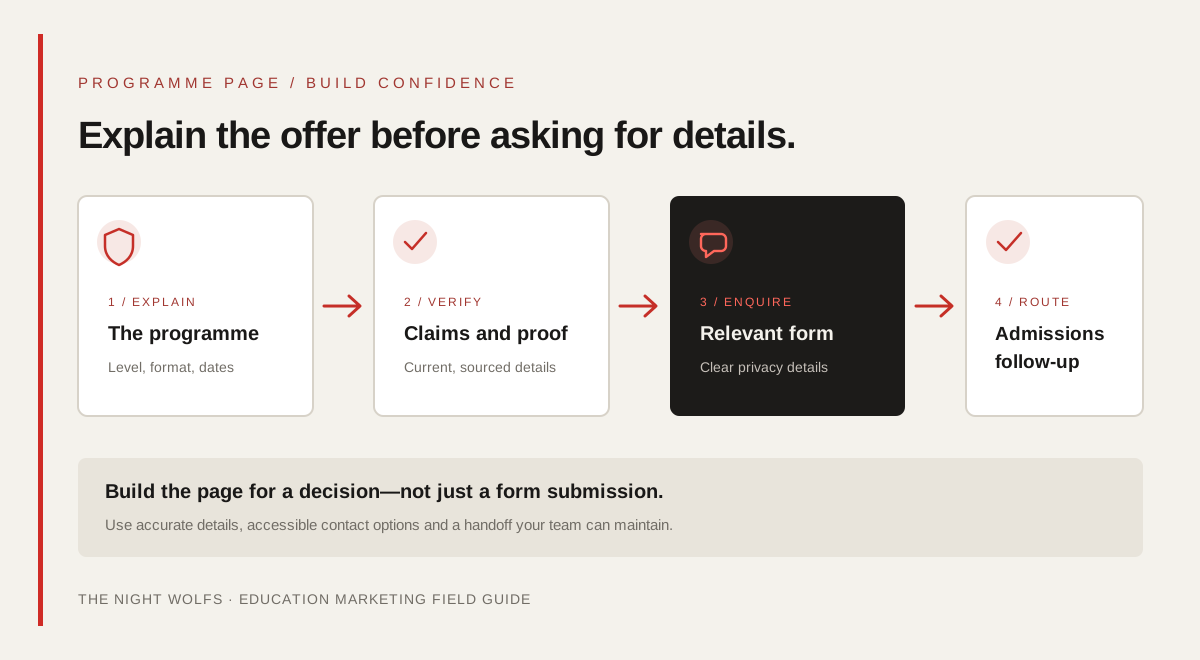
Send each campaign to the page that best matches the programme or event—not automatically to the homepage. Put the course name, level, location or online format, next intake and a clear action near the top. Use plain language to explain who the programme is for and what someone should do next.
Give visitors enough information to make a sensible comparison: curriculum or subjects, duration, eligibility, teaching format, fee components, important dates, facilities that actually exist, contact details and the application steps. If a fee depends on eligibility or a scholarship assessment, explain that instead of making a headline offer look universal.
Answer common questions in visible page content. A frequently asked questions section can clarify documents, campus visits, refund or cancellation rules, class schedules and assessment methods. Keep it accurate and update it when policy changes. A page should remain useful to people who do not submit a form.
- Use a distinct page for a distinct programme or event when the information is meaningfully different.
- State the current eligibility, schedule, format, location and fee conditions.
- Make the application, visit or enquiry action work on a phone.
- Do not create near-identical neighbourhood pages without distinct, useful information.
TRUST / CHECK EVERY PUBLIC PROMISE
Substantiate education claims before they enter an ad
Education decisions carry significant weight for students and families. ASCI’s education-advertising guidelines cover institutions, programmes and platforms, including schools, colleges, coaching classes and EdTech. They call for evidence behind claims about recognition, affiliation, accreditation, rankings, results, placements, admissions, faculty and facilities. Keep the source, date, scope and approval for every claim that appears in an ad or landing page.
Be precise with outcomes. If an advertisement cites a placement rate, test score, rank, compensation or admission result, confirm the cohort, period, denominator and methodology. ASCI’s guidelines specify additional presentation requirements for some claims, including identifying the source of a competitive ranking and providing context for placement figures. Do not turn a single student story into a typical outcome.
Avoid guaranteed rank, marks, admission, employment or salary claims unless they can be substantiated and presented in accordance with the applicable guidance. Do not imply official recognition or affiliation without evidence. Use real, current campus imagery and obtain permission for identifiable student or alumni testimonials. This is practical marketing guidance, not legal advice; review the current rules for the institution and campaign before launch.
| Claim type | Before publishing |
|---|---|
| Recognition or affiliation | Verify the specific programme and authority; name it accurately where required. |
| Ranking or award | Keep the current source, date, category and exact scope of the ranking. |
| Placement or admission result | Verify the latest completed cohort, total group and calculation method. |
| Student testimonial | Confirm the person, programme, permission and context of the experience. |
| Campus, lab or faculty image | Use real, current material that represents the advertised institution. |
LEAD CAPTURE / RESPECT THE PERSON
Make enquiry forms useful, proportionate and private
Ask only for information the admissions team needs to respond: for example, a name, a contact method, the programme of interest and a suitable time to call. Explain what will happen after submission. Avoid asking for sensitive documents, identity numbers or detailed personal information at an early marketing stage unless the institution has a clear, necessary process for collecting it.
Publish an accessible privacy policy and explain the intended contact. Keep enquiry data within approved systems, restrict access to staff who need it, and set a retention and deletion process. When communicating with minors, follow the institution’s safeguarding procedures and applicable privacy requirements; involve a parent or guardian where appropriate rather than treating a child’s marketing profile as an ordinary lead.
Google Ads lead form assets require a privacy-policy link and are available only to eligible accounts and verticals. Google currently states that leads can be downloaded for the last 30 days and are stored in Google Ads for 60 days. Configure a timely export, webhook or CRM connection so an interested family is not lost when the platform’s retention window passes. Recheck current platform requirements before setup.
- Link the form to a clear privacy policy and explain the follow-up.
- Use a small number of useful fields and validate the programme selection.
- Restrict access and define how long enquiry records are kept.
- Send submissions to an owned admissions workflow, not just an ad-platform inbox.
- Check lead-form eligibility and current platform retention settings before launch.
ADMISSIONS OPERATIONS / MAKE THE HANDOFF REAL
Route each enquiry to a prepared admissions team
A lead is only useful when someone can respond with the right information. Assign an owner for each programme or campus, decide how enquiries are shared during working hours, and provide a fallback when the usual contact is unavailable. Set response expectations that the institution can consistently meet; do not advertise instant counselling if the team cannot deliver it.
Record a simple status such as new, contacted, visit scheduled, application started, enrolled or not proceeding. Capture the reason an enquiry is not suitable when it is appropriate and lawful to do so. This helps the team learn whether the campaign, page, eligibility wording or response process needs attention.
Prepare approved answers for recurring questions about fees, eligibility, schedules and admissions dates. If an automated assistant is used, make its role clear, avoid inventing course facts, and offer a straightforward route to a person. Keep a record of the current programme information so responses do not drift from the official page.
MEASUREMENT / FOLLOW THE OUTCOME
Measure enquiry quality and admissions progress
A campaign dashboard should distinguish a form submission from a qualified enquiry, a campus visit, an application and an enrolment. Agree on each definition with the admissions team before launch. If the CRM uses different names or counts duplicate submissions, report those rules so the numbers can be interpreted.
Tag campaign links consistently and connect ad-platform data to the institution’s own lead records where appropriate. Use consent-aware measurement and do not put names, phone numbers, email addresses or other personal information into analytics URLs or event parameters. Reconcile platform-reported conversions with actual CRM stages; attribution can be incomplete when a family changes devices or contacts the institution another way.
Review cost per qualified enquiry alongside application completion, attendance at visits and enrolment quality. Compare similar programmes and periods. If a campaign brings many low-fit enquiries, check eligibility wording and page clarity before increasing spend. Treat a short-term difference as a question to investigate, not proof that one channel will always perform better.
| Stage | Example question |
|---|---|
| Enquiry | Did a real person ask about the programme? |
| Qualified enquiry | Does the enquiry match the stated programme and eligibility? |
| Visit or counselling | Did the person complete the next conversation or visit? |
| Application | Was an application started and then completed? |
| Enrolment | Did the person enrol, and can the institution connect that outcome to the campaign responsibly? |
ACTION PLAN / A CONTROLLED FIRST MONTH
Use a four-week plan to launch with control
A smaller, well-checked campaign is easier to learn from than several programmes launched with incomplete information. Use the first month to confirm the offer, page, lead handoff and measurement before deciding whether to expand.
- Week 1: choose one programme, define the audience, confirm dates and approve claim evidence.
- Week 2: publish or update the programme page, check mobile forms, privacy details and application links.
- Week 3: launch a focused channel test with clear source tags and an assigned admissions owner.
- Week 4: review qualified enquiries, response quality, visits and applications; fix the largest gap before adding scope.
- Keep a change log for campaign copy, dates, budgets and landing-page updates.
The plan is a practical sequence, not a guaranteed timeline for enrolments or search visibility. Admissions calendars, course capacity, seasonality and staff availability should determine the actual pace.
THE DETAILS
Questions worth
asking early.
Clear answers about education marketing in mumbai before you choose your next step.
What is education marketing?
Education marketing explains a school, college, coaching class or learning programme to the students and families it serves. It can include search, social, video, events and follow-up, but the information and claims need to be accurate and useful.
How can an institute generate admissions enquiries in Mumbai?
Start with one programme and its real audience. Publish a clear programme page, make contact and visit details accurate, choose channels that match the audience’s intent, and assign an admissions owner to follow up. Measure qualified enquiries and application progress rather than only counting form fills.
What should a course landing page include?
Include the programme name, level, eligibility, curriculum, duration, learning format, location, fee conditions, current dates, contact details and application steps. Add only verified recognition, ranking, outcome or facility claims, and make the next action easy to complete on a phone.
Can an education advertisement promise a rank or job?
Do not make an outcome promise casually. ASCI’s education-advertising guidance requires substantiation for covered claims and sets additional requirements for some guarantees, rankings and placement claims. Check the current guidance and applicable rules before publishing.
Should schools collect student details through ad forms?
Use a form only when the institution can explain why each field is needed, how the information will be used and who will contact the person. Provide a privacy-policy link, limit access and follow safeguarding and applicable privacy requirements, especially when a minor may submit the form.
SOURCES & FURTHER READING
- ASCI — Guidelines for advertising of educational institutions, programmes and platforms (opens in a new tab)
- Google Ads Help — About lead form assets (opens in a new tab)
- Google Ads Policies — Misrepresentation (opens in a new tab)
- Google Business Profile Help — Guidelines for representing your business (opens in a new tab)